Deont Google Slide Template: A Fresh Approach to Visual Storytelling
Creating a presentation that captures attention and communicates your message effectively is a challenge many professionals face. Whether you're pitching a new idea to clients, sharing a quarterly report with your team, or showcasing your portfolio, the visual foundation of your slides matters. The Deont Google Slide Template offers a structured yet flexible solution designed to help you build presentations that look polished and professional without spending hours on design work. With its extensive collection of slides and thoughtful organization, this template provides a reliable starting point for a wide range of projects.
What Makes This Template Stand Out?
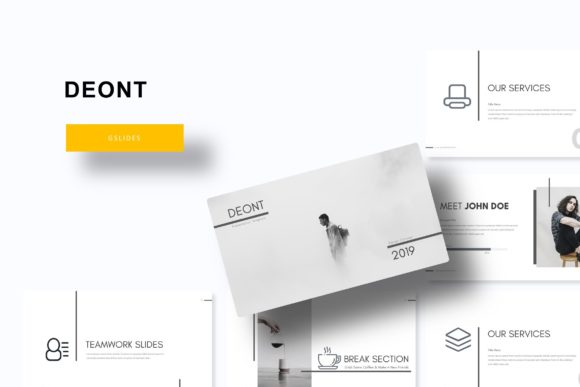
At its core, the Deont template is built around versatility. It includes over 150 total slides, organized into five premade color schemes. Each color variation contains 30 unique slides, giving you ample room to experiment and find the right look for your specific audience. The color palettes are carefully selected to feel modern and adaptable—whether you're presenting a creative project, a business plan, or an educational workshop, you'll find a combination that fits the mood you're trying to set.
Beyond the color options, the template features handcrafted infographics that turn complex data into clear, engaging visuals. Instead of relying on generic chart styles, these infographics are designed with attention to detail, helping your numbers and statistics tell a story rather than just occupying space on a slide. The section break slides provide natural transitions between topics, keeping your audience oriented as you move through your content. Meanwhile, the gallery and portfolio slides offer dedicated layouts for showcasing images, products, or past work—ideal for designers, photographers, or agencies looking to impress potential clients.
Practical Design Features That Save Time
One of the most useful aspects of this template is its drag-and-drop picture placeholders. Rather than manually resizing and repositioning images, you can simply drop your photos into pre-sized frames that automatically adjust to fit. This small detail can save significant time when you're working with a large number of images or when you need to swap out visuals quickly before a meeting. The resizable and editable graphics also mean you're not locked into a single layout—you can scale elements up or down, change colors, and adjust shapes to match your brand guidelines or personal preferences.
The template is based on master slides, which ensures consistency across your entire presentation. When you make a change to the master slide, it updates throughout the document, helping you maintain a cohesive look without manually editing each page. This feature is particularly valuable for teams or individuals who need to apply consistent branding across multiple presentations. The pixel-perfect illustrations add a layer of polish that elevates the overall quality, making your slides look like they were designed by a professional rather than assembled from a generic template library.
Who Can Benefit From Using This Template?
The Deont template is well-suited for a broad audience. Small business owners can use it to create investor pitches, product launches, or internal training materials. Marketing professionals will find the infographic slides helpful for presenting campaign results or social media analytics. Content creators and bloggers can adapt the portfolio layouts to showcase their work or collaborate with brands. Educators and trainers can structure course materials or workshop content in a visually engaging way that keeps students focused.
For those working in branding or visual identity, the template serves as a practical tool for presenting brand guidelines, mood boards, or design concepts to clients. The ability to customize colors and layouts means you can align the presentation with a client's existing brand assets, creating a seamless experience that reinforces their visual identity. Even hobbyists or side-project creators can use the template to organize ideas for personal projects, community events, or freelance work.
Tips for Getting the Most Out of Your Slides
When working with any presentation template, it's helpful to start by defining your core message. Before you dive into editing slides, take a few minutes to outline the key points you want to communicate. This will help you choose the most relevant slides from the template and avoid cluttering your presentation with unnecessary content. Remember, a good presentation guides the audience through a logical progression of ideas—each slide should serve a purpose and build on the previous one.
Pay attention to typography and readability. While the template comes with suggested fonts, you can substitute your own if they better match your brand. Just make sure the fonts you choose are easy to read at a distance, especially if you're presenting in a large room or sharing your screen during a video call. Stick to two or three font styles maximum to keep things clean and professional. Use headings to break up content and bullet points to highlight key takeaways, but avoid overcrowding slides with too much text.
Take advantage of the color variations included with the template. If you're presenting to different audiences or on different topics, switching between color schemes can give your presentation a fresh feel without requiring a complete redesign. You might use one palette for internal team meetings and another for client-facing presentations. This kind of flexibility helps you maintain visual interest while staying true to your brand or the tone of your message.
What's Included in the Package?
When you download the Deont Google Slide Template, you'll receive five PPTX files in widescreen format, each corresponding to one of the five premade color schemes. A readme file is included to guide you through setup and customization, and the package also provides a link to download the free fonts used in the template. This ensures you can replicate the exact look shown in the preview without having to hunt for compatible typefaces. Keep in mind that the photographs and images shown in the preview are for illustration purposes only and are not included in the download—you'll need to supply your own visuals, which is actually a benefit since it allows you to use images that are directly relevant to your content and brand.
Final Thoughts on Building Better Presentations
A well-structured template like Deont can serve as a strong foundation, but the real impact comes from how you use it. Focus on telling a clear story, keeping your slides visually balanced, and tailoring the content to your audience's needs. Whether you're closing a deal, teaching a concept, or sharing your creative work, the goal is to communicate with clarity and confidence. With its combination of thoughtful design, practical features, and versatile layouts, this template gives you the tools to do just that—without requiring advanced design skills or a large budget.