Mastering Visual Consistency with the Normalism Google Slide Template
Imagine this: You’re preparing a pitch for a potential investor, or perhaps designing a social media campaign for your new product launch. You open your presentation software, stare at the blank slides, and realize that creating a cohesive, professional, and visually striking deck from scratch is going to eat up hours you simply don’t have. This is where the right design asset changes everything. The Normalism Google Slide Template isn't just another set of slides; it's a comprehensive system designed to bring clarity, professionalism, and visual harmony to your projects, whether you're a startup founder, a seasoned marketer, or a creative freelancer.
A System Built for Real-World Presentations
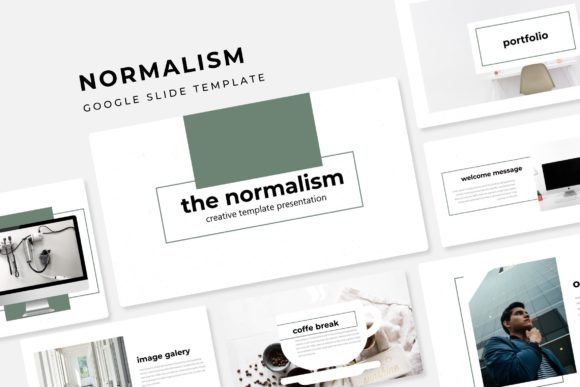
What sets this template apart is its foundation in practical design principles. With over 150 total slides, you're not getting a handful of layouts and then left to fend for yourself. The package includes 30 meticulously crafted slides for each of five premade color variations. This structure is a game-changer for brand consistency. Instead of guessing which shade of blue or green matches your brand guidelines, you can select the color theme that aligns perfectly with your existing identity and know that every chart, icon, and text block will follow that palette seamlessly. This eliminates the visual dissonance that can make a presentation look amateurish and ensures your message is supported by a unified aesthetic.
Infographics That Tell a Story, Not Just Display Data
Data is crucial, but raw numbers on a slide can cause an audience to disengage. The handcrafted infographics within the Normalism template are designed to translate complex information into intuitive visual narratives. Instead of a standard bar graph, you might find a process flow that clearly illustrates the stages of your product's development, or a comparison slide that highlights your competitive advantage at a glance. These aren't generic shapes; they are thoughtfully designed illustrations that guide the viewer's eye and make your key points memorable. For a marketing professional presenting quarterly results or a small business owner explaining a service workflow, these infographics do the heavy lifting of communication.
Beyond Slides: A Toolkit for Visual Branding
The utility of this package extends far beyond a simple Google Slides presentation. The inclusion of section break slides and dedicated gallery/portfolio layouts opens up a world of applications. Consider using the gallery slides to create a digital lookbook for your products, a mood board for a client consultation, or a portfolio showcase for your design work. The pixel-perfect illustrations and resizable, editable graphics ensure that these assets look sharp whether displayed on a large screen during a webinar or embedded on a website. The drag-and-drop picture placeholder functionality is particularly valuable for content creators and bloggers who need to quickly swap images without breaking the layout's alignment, saving significant time in the content production pipeline.
Practical Integration into Your Workflow
Adopting a new design asset should streamline your process, not complicate it. The Normalism template is based on master slides, which is a critical feature for maintaining efficiency. Any change made to the master slide—like updating a logo or adjusting the footer text—automatically propagates across all 30 slides in that color theme. This is invaluable for ensuring brand consistency across large decks or when multiple team members are collaborating. For entrepreneurs and small teams, this means less time on tedious formatting and more time on refining your core message. The inclusion of five PPTX files for widescreen format also means you're prepared for modern display standards, whether you're presenting in a boardroom or sharing your screen on a video call.
Choosing Your Visual Voice
Typography within the template is chosen for clarity and modern appeal. The font pairing—a thoughtful combination that likely balances a clean sans-serif for body text with a complementary display font for headings—ensures readability across different screen sizes and lighting conditions. This is a subtle but powerful element of professional presentation design. When selecting a font for your own projects, whether for a logo, packaging, or social media graphics, consider how it reflects your brand's personality. Is it approachable? Authoritative? Innovative? The typography in Normalism leans towards a contemporary, versatile aesthetic that works for tech startups, creative agencies, and educational content alike.
Final Thoughts on Leveraging Design Assets
In the realm of visual communication, the tools you choose directly impact how your audience perceives your brand. A cohesive and well-designed presentation builds trust and enhances message retention. The Normalism Google Slide Template offers a robust foundation for that visual consistency. Remember that all photographs used in previews are for illustration; the true value lies in the structured layouts, the color system, and the editable graphic elements. By integrating these assets thoughtfully—pairing them with your own high-quality images and tailored content—you can create presentations, marketing materials, and digital products that not only look polished but also communicate with greater impact and professionalism. It’s about having a reliable framework that elevates your ideas, allowing your unique content to shine through a lens of expert design.