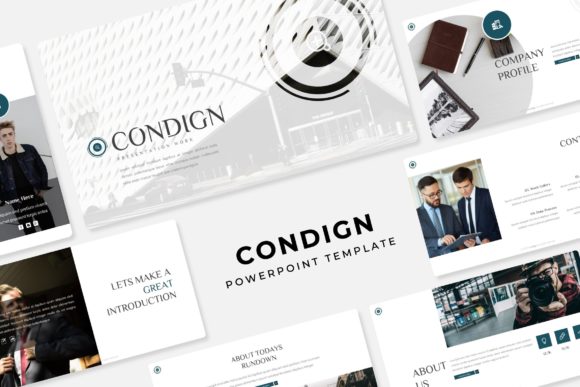
Condign Power Point Template: Crafting Cohesive Visual Narratives
There's a particular frustration that hits when you're staring at a blank presentation slide at 11 PM, knowing you have a pitch meeting at 9 AM. You've got the content figured out—the data, the story, the strategy—but the visual framework feels impossible to build from scratch. This is where a well-constructed template system changes everything, not just as a time-saver but as a creative catalyst that pushes your ideas into sharper focus.
Beyond Generic Slides: A System Built for Visual Storytelling
The Condign Power Point Template isn't a single file you download and hope for the best. It's a collection of five PPTX files, each built around a distinct premade color palette, with 30 slides per variation. That's 150+ total slides designed to work together without visual contradictions. The color schemes aren't random either—they're curated to feel intentional, whether you're presenting quarterly results to stakeholders or pitching a creative concept to a potential client.
What stands out immediately is the handcrafted infographic work embedded throughout. These aren't auto-generated charts that look like they came from a spreadsheet. Each infographic section was designed with real presentation scenarios in mind—comparing data points, illustrating processes, showing growth trajectories. The section break slides create natural breathing room in your narrative, giving audiences a visual cue that you're shifting gears. And the gallery and portfolio slides? Those are built for people who need to showcase actual work—designers, photographers, agencies, consultants—without wrestling with alignment issues for hours.
The Practical Mechanics That Actually Matter
Here's what separates a useful template from a frustrating one: how it handles real-world editing. Every graphic element in the Condign template is resizable and editable. The picture placeholders use a drag-and-drop system anchored to master slides, which means you're not accidentally breaking layouts when you swap in your own images. You drop a photo into the designated area, and it conforms to the frame. No cropping surprises, no awkward aspect ratio disasters.
The pixel-perfect illustrations deserve specific mention. In many templates, vector elements look fine at first glance but fall apart when you resize them or project them on a large screen. These hold up. Whether you're presenting on a laptop in a coffee shop or projecting onto a conference room wall, the lines stay crisp and the proportions stay true. That level of detail matters more than most people realize until they've watched a blurry icon get projected at 1080p during a client meeting.
Five Color Variations, One Design Language
The five premade color palettes aren't just about aesthetics—they're about flexibility across different brand contexts. One variation might lean into muted, professional tones suited for financial services or consulting. Another might use bolder contrasts that work for tech startups or creative agencies. Having 30 slides per color scheme means you're not constantly recycling the same three layouts. You have room to develop a full presentation arc—opening, problem statement, solution, data support, case studies, team introductions, timelines, and closing calls to action—without visual repetition becoming obvious.
This is particularly useful if you're a freelancer or agency working with multiple clients. Instead of building each presentation from scratch or buying separate templates for different industries, you can pull from a single system and adapt the color story to match each client's brand identity. The design language stays consistent while the personality shifts.
Real Applications Across Industries
Think about the range of people who build presentations regularly. A small business owner preparing a pitch for local investors. A marketing manager rolling out a new campaign strategy to internal teams. A content creator developing a workshop curriculum. A nonprofit director presenting annual impact reports to donors. A freelancer showcasing a portfolio to prospective clients. Each of these scenarios demands visual professionalism, but none of them have the budget or timeline to hire a presentation designer for every deck.
The Condign template works across these contexts because it doesn't lock you into a single aesthetic. The master slide architecture means you can modify global elements—fonts, colors, layouts—without touching individual slides. Change the font pairing once at the master level, and every slide updates. Swap the color scheme, and the entire deck transforms. This kind of structural thinking is what makes a template genuinely useful rather than just visually appealing in a preview image.
Typography and Readability Considerations
The package includes a readme file with font download links, and the fonts used are free for commercial use. This matters more than people initially think. Nothing derails a presentation faster than opening the file on a different computer and discovering the fonts have defaulted to something generic because the original typefaces weren't installed or were improperly licensed.
When you're choosing how to apply typography within this template—or any template—consider the viewing context. Body text on presentation slides needs to be larger than you'd use in a printed document. Your audience isn't reading; they're listening while glancing at projected text. Keep paragraphs short. Use the infographic and section break slides to replace text-heavy explanations wherever possible. The template's design already supports this approach, with dedicated layouts for visual data that reduce your reliance on bullet points.
What's Actually in the Box
The download includes five PPTX files in widescreen format, one for each color variation. The readme file walks you through setup, including the free font download links so you can maintain visual consistency from the start. A quick note that the photographs and lifestyle images shown in template previews are for illustration purposes only—they're not included in the download. You'll need to supply your own imagery, which is honestly better anyway. Your presentation should feature your actual work, your team, your products, your data. Stock imagery in a pitch deck reads as impersonal, and the drag-and-drop placeholders in this template make inserting your own photos genuinely simple.
Matching the Template to Your Communication Goals
Before you start dropping content into slides, spend ten minutes mapping out your presentation arc. What's the single takeaway you want your audience to leave with? Build backward from there. Use the section break slides to mark transitions between major points. Reserve the portfolio and gallery layouts for moments when you need visual proof—case studies, product shots, before-and-after comparisons. Let the infographic slides handle your data storytelling.
The best presentations feel effortless to the audience, but that effortlessness comes from deliberate structural choices made before anyone opens the file. A template like Condign gives you the architectural foundation. Your job is to fill it with content that actually earns your audience's attention.