Aocure Keynote Template: A Designer's Toolkit for Polished Presentations
There’s a specific kind of frustration that hits when you’re staring at a blank slide deck. You have the content, the data, the big idea—but making it look professional, cohesive, and visually engaging feels like a separate, time-consuming project. For many of us, whether we're pitching a new client, presenting quarterly results, or launching a product, the presentation is the final barrier between a good idea and a great impression. The Aocure Keynote Template is built to dismantle that barrier, offering a structured yet flexible foundation for anyone who needs to communicate ideas with clarity and style.
Beyond the Default: What Makes This Template System Work
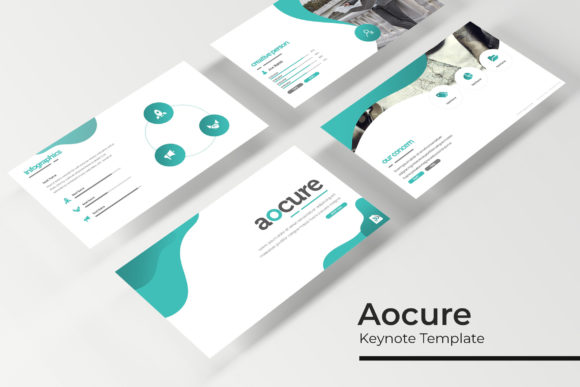
At its core, Aocure isn't just a single file with a few nice slides. It's a comprehensive system designed for real-world use. The package includes 150+ total slides, organized into five distinct, premade color themes. Each color variation contains 30 meticulously crafted slides, providing ample room to build narratives without repetition. This structure immediately solves a common problem: visual monotony. Instead of cycling through the same five layouts, you have a dedicated palette and set of designs for different moods or brand guidelines, ensuring your presentation feels fresh from start to finish.
The design philosophy centers on "pixel-perfect illustrations" and handcrafted infographics. This means the charts, icons, and graphical elements aren't generic placeholders; they are custom-designed assets that integrate seamlessly with the overall aesthetic. For a marketer presenting campaign results or a small business owner outlining a business plan, this translates to data slides that look insightful and professional, not like afterthoughts. The inclusion of dedicated section break slides and gallery/portfolio slides further demonstrates an understanding of presentation flow, helping to guide your audience's attention logically from one topic to the next.
Practical Applications for Creators and Communicators
The true value of a tool like the Aocure Keynote Template reveals itself in its versatility. Consider these scenarios:
- Brand Identity & Client Pitches: A graphic designer can use the consistent master slides to present a full brand identity package—logo concepts, color palettes, typography guidelines, and mockups—within a single, cohesive deck. The professional polish elevates the perceived value of the work.
- Marketing & Social Media Strategy: Content creators and social media managers can outline quarterly strategies, showcase campaign analytics using the handcrafted infographics, or present content calendars in a visually compelling way that stakeholders actually enjoy reviewing.
- Product Launches & Investor Pitches: Entrepreneurs can leverage the clean layouts to tell a compelling story about their product. The picture placeholders allow for easy drag-and-drop integration of product shots, lifestyle imagery, or UI screenshots, making the presentation feel dynamic and tangible.
- Educational & Workshop Materials: The template's structure is ideal for educators or workshop facilitators. The section breaks help segment a curriculum, and the variety of slide types (from text-heavy to image-focused) can accommodate different teaching methods and materials.
Even for personal projects, like planning a wedding, organizing a community event, or creating a family photo book slideshow, the template provides a framework that turns a simple collection of slides into a polished narrative.
Design Intelligence Built into the Slides
Several features speak directly to a designer's workflow and a non-designer's need for simplicity. The fact that it is "Based on Master Slides" is fundamental. This means you can edit a font, color, or logo in one central place, and the change will cascade throughout the entire presentation, guaranteeing visual consistency. This is a non-negotiable for maintaining a professional brand image.
Equally important are the "Resizable and Editable Graphic Picture Placeholders." This isn't just about convenience; it's about design integrity. When you drag an image into a pre-defined placeholder, the composition remains balanced. The aspect ratios are correct, the text overlays (if any) remain legible, and the overall layout isn't thrown off by an awkwardly sized photo. This feature alone can save hours of adjustment and prevent the "messy" look that plagues many hurried presentations.
The promise of "Drag & Drop" functionality, combined with the master slide system, means that even someone with minimal Keynote experience can assemble a deck quickly without sacrificing quality. You're working with a pre-approved design grid, not starting from scratch.
Maximizing the Toolkit: Tips for Effective Use
To get the most out of a template like this, a thoughtful approach is better than a frantic one. Start by reviewing all five color themes. Don't just pick your favorite; consider which palette best aligns with your project's tone or your client's brand. A deep blue theme might convey trust and stability for a financial report, while a vibrant, multi-colored theme could energize a creative portfolio presentation.
Next, audit the 30 slides within your chosen theme. You likely won't use all of them, and that's by design. Curate the ones that best serve your story. A strong presentation often follows a narrative arc: problem, solution, evidence, call to action. Use the template's variety to support this structure. The "Gallery and Portfolio slide" is perfect for the evidence section, while the "Section Break Slides" act as chapter markers for your audience.
When it comes to typography, the template uses a free font, and the download link is included—a considerate touch that removes licensing headaches. However, always take a moment to review the font styles included. If you're embedding this presentation into a broader brand ecosystem, ensure the typeface complements your existing brand fonts. Sometimes, using the template's font for headings and your established brand font for body text can create a harmonious and unique pairing that feels both fresh and familiar.
What's in the Box: A Note on Assets
The package is straightforward: 5 PPTX files for standard aspect ratios, 5 for widescreen, and a Readme file to guide you. A crucial detail noted is that the preview photographs are not included. This is standard and important to understand. The template provides the structural and graphical framework; you supply the contextual imagery. This is actually a benefit, as it forces the presentation to be populated with your own relevant photos, screenshots, or licensed stock images, ensuring the final product is uniquely yours and not filled with generic placeholders.
Ultimately, the Aocure Keynote Template is less about the template itself and more about what it enables. It's a catalyst for clear communication, a guardrail against design inconsistency, and a time-saving asset that allows you to focus on your message rather than the mechanics of slide design. For the entrepreneur, the marketer, the teacher, or the creative professional, it’s a practical tool that bridges the gap between a great idea and a presentation that does it justice.