Relaunch Keynote Template: Your Blueprint for Polished Presentations
We've all been there: staring at a blank slide deck with a looming deadline, knowing that the presentation needs to look sharp but feeling completely uninspired by the default templates. A powerful idea deserves more than a generic background and bullet points. It needs a visual framework that commands attention and communicates professionalism from the first click. This is where a thoughtfully designed asset like the Relaunch Keynote Template steps in, not just as a set of slides, but as a foundational tool for clear, impactful storytelling.
A Visual System, Not Just a Slide Deck
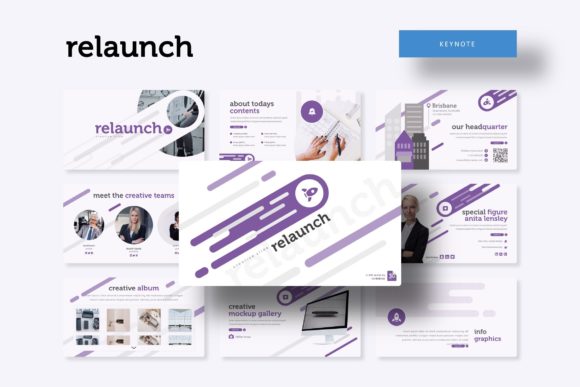
What immediately sets the Relaunch Keynote Template apart is its structured approach to design. With over 150 total slides organized across five distinct, premade color themes, it offers a complete visual system. Each color variation provides 30 unique slides, ensuring you have a cohesive palette ready to match any brand identity or project mood. This isn't about having a hundred slightly different versions of the same chart; it's about providing versatile layouts—from section breaks that elegantly pause your narrative to dedicated gallery and portfolio slides that let your work shine.
The real value for a busy entrepreneur or designer lies in the details that save time and elevate quality. The handcrafted infographics transform complex data into engaging visuals, while pixel-perfect illustrations add a layer of polish that’s hard to achieve from scratch. The inclusion of picture placeholders that allow for simple drag-and-drop functionality means you can swap out imagery without disrupting the layout's alignment or aesthetic. It’s a practical feature that respects both your time and your need for precision.
Practical Applications Across Your Brand Ecosystem
Think beyond the boardroom. A versatile presentation template like this is a multipurpose design asset that can unify your brand’s visual communication across numerous touchpoints. The consistent typography, clean lines, and professional layouts are perfect for:
- Client Pitches & Investor Decks: Present your business plan, service offerings, or project proposal with the clarity and confidence of a major consultancy. The structured slides guide your narrative logically.
- Internal Training & Workshops: Create engaging educational materials for your team. The infographic slides are ideal for explaining processes, workflows, or company values in an easily digestible format.
- Marketing & Sales Enablement: Develop compelling sales decks, product launch presentations, or quarterly business reviews that align seamlessly with your other marketing collateral.
- Content & Social Media Strategy: Use the portfolio and gallery slides to curate mood boards or showcase campaign results. You can even export individual slides as high-quality graphics for use in social media carousels or blog post headers.
- Event Planning & Invitations: Design sophisticated slideshows for conferences, webinars, or even elegant event invitations that set the tone before the day arrives.
This adaptability helps improve visual consistency—a key pillar of strong brand recognition. When your investor deck, your team training, and your social media content share the same design DNA, you build a professional image that’s memorable and trustworthy.
Mastering Your Message with Master Slides
One of the most powerful features for anyone who values efficiency is the template’s foundation on Master Slides. This means the core structure, fonts, and color schemes are controlled from a central place. Making a global change—like updating your brand’s primary color or adjusting the body text font—takes seconds, not hours of manual edits across 150+ slides. This technical backbone ensures that even as you customize and adapt the template for different projects, the underlying design integrity remains intact.
The package’s thoughtful inclusion of a “Readme First” file and links to the free fonts used is a small but critical detail. It eliminates the frustration of opening a file only to find missing typefaces, ensuring your first experience is smooth. This kind of user-centric consideration speaks to the template’s quality—it was designed by someone who understands the real-world workflow of creating presentations.
Making It Your Own: A Few Considerations
While the Relaunch Keynote Template provides an exceptional starting point, its true power is unlocked through customization. Here’s how to approach it effectively:
- Align with Your Brand Palette: The five premade colors are fantastic starting points, but don’t hesitate to use the Master Slides to input your exact brand hex codes. This transforms a great template into your unique signature.
- Typography Pairing: The included fonts are selected for harmony, but consider how they pair with your existing brand fonts. You might use the template’s display font for headlines and integrate your own brand’s sans-serif for body text, creating a fresh yet consistent look.
- Content is King: Use the structured layouts as a guide for your narrative. Let the section breaks punctuate your key ideas, and use the infographic slides only when they genuinely simplify a concept for your audience. The best design serves the message, not the other way around.
- Test for Readability: Always preview your slides in presentation mode. Ensure your text has enough contrast against the background and that your chosen font size remains legible when projected or viewed on a screen. The clean aesthetic of this template generally supports readability, but your specific content must be tested.
Ultimately, a resource like the Relaunch Keynote Template is about removing barriers. It eliminates the design bottleneck, allowing you to focus your energy on what you’re communicating rather than how it’s laid out. For the entrepreneur building a brand, the designer creating a client deliverable, or the marketer crafting a campaign, it provides a professional, flexible, and visually cohesive foundation to present ideas with authority and style.
Note: All photographs or pictures used in the preview are not included, they are intended for illustration purpose only.