Jojoba Keynote Template: A Visual Toolkit for Modern Presentations
There's a moment in every presentation where the audience either leans in or tunes out. It often happens before you've said a single word—it happens the second your first slide appears. The design, the color, the clarity of your visuals all send an immediate signal about the quality and thought behind your message. For anyone building a brand, pitching an idea, or teaching a complex concept, that first impression is everything. This is precisely the challenge the Jojoba Keynote Template was built to solve, offering more than just slides; it provides a complete visual language for your ideas.
Beyond a Single Color Palette: The Five-Premade Advantage
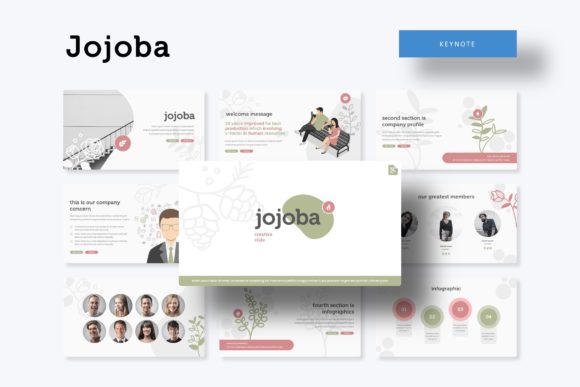
One of the most common frustrations with presentation templates is the lack of flexibility. You download a file, and while the layout might be clean, the color scheme is fixed, forcing you into a tedious process of manual recoloring that often breaks the design's harmony. Jojoba sidesteps this issue entirely by including five distinct premade color variations. Each isn't a simple hue swap but a fully realized aesthetic direction. This means you get 30 unique, professionally designed slides per color theme, culminating in over 150 total slides. Whether your brand identity is warm and earthy, cool and corporate, or vibrant and creative, there's a foundational palette ready to go. This approach respects the reality that a startup's pitch deck and a creative agency's portfolio require fundamentally different color energies.
The value here is immense for maintaining visual consistency. Instead of cobbling together slides from different sources, you're working within a unified system. The typography, iconography, and layout grids are designed to work seamlessly across all five color schemes, ensuring that no matter which variation you choose, your presentation will look cohesive and professional.
The Anatomy of a Useful Slide: Infographics, Portfolios, and Placeholders
A beautiful slide is useless if it can't communicate effectively. The Jojoba template understands this, integrating handcrafted infographics directly into its structure. These aren't generic bar charts and pie graphs; they are custom-illustrated elements designed to make data digestible and engaging. From process flows and timelines to comparison tables and statistical breakdowns, these infographics help transform dry numbers into compelling visual stories. For marketers explaining campaign results or entrepreneurs illustrating market growth, this feature is a direct path to clearer communication and audience engagement.
Beyond data visualization, the template includes dedicated Gallery and Portfolio slides. These are essential for anyone whose work is visual—designers showcasing past projects, photographers displaying their best shots, or retailers presenting product lines. The layouts are crafted to give each image breathing room while creating an attractive overall composition. Furthermore, every graphic element is resizable and editable, and the picture placeholders utilize a simple drag-and-drop functionality based on Master Slides. This means updating images is incredibly straightforward, and the underlying design integrity remains intact, saving hours of alignment and formatting work.
From Concept to Delivery: Streamlining Your Workflow
The true test of any design asset is how it integrates into a real-world workflow. Jojoba is built on Master Slides, the backbone of efficient PowerPoint and Keynote design. This architecture ensures that global changes—like updating a font or adjusting a logo placement—propagate throughout the entire presentation instantly. The inclusion of Section Break Slides is another thoughtful touch, providing clear visual markers that help structure your narrative and give your audience natural pause points.
For the time-pressed entrepreneur or small business owner, this structured approach is a game-changer. It allows you to focus on your content and message rather than wrestling with software. The pixel-perfect illustrations and consistent grid system mean that even if you're not a trained designer, you can assemble a presentation that looks like it was crafted by one. This elevates the perceived quality of your brand identity and can be the subtle difference that builds trust with investors, clients, or customers.
Practical Applications Across Your Brand Ecosystem
The utility of a robust presentation template like Jojoba extends far beyond the conference room or Zoom meeting. Consider these practical applications:
- Brand Guidelines & Internal Training: Use the cohesive slides to create living brand guideline documents or onboarding materials for new team members.
- Social Media Content: Export individual slides or elements to create consistent social media graphics for Instagram carousels, Facebook posts, or LinkedIn infographics.
- Digital Products & Marketing Assets: Adapt the layouts to design beautiful digital lookbooks, email newsletter headers, or webinar promotional materials.
- Print Materials & Invitations: The clean, scalable designs translate well to print. Use the templates as a foundation for designing event programs, workshop invitations, or even product packaging inserts.
By using a single, versatile template system across these different touchpoints, you reinforce your brand recognition. The same visual language appears whether someone is viewing your pitch deck, scrolling through your Instagram, or reading a printed flyer. This consistency is a cornerstone of professional brand identity development.
What's in the Package and Getting Started
Clarity on deliverables is crucial. The Jojoba package includes 5 PPTX files for standard aspect ratio and 5 PPTX Widescreen files, covering the two most common presentation formats. Alongside these, you'll find a Readme First document that outlines setup instructions. A significant perk is the inclusion of a free font download link for the typeface used in the designs. This eliminates the guesswork and ensures your text renders exactly as intended, preserving the typographic harmony the designers intended. Remember, as noted, the photographs and pictures in any preview are for illustration purposes only and are not included; you will need to supply your own high-quality images to complete the narrative.
When you begin customizing, start with the color variation that best aligns with your project's mood. Then, systematically replace the placeholder images with your own visuals. The editable graphics and drag-and-drop functionality make this process intuitive. Experiment with the infographic elements to visualize your unique data. The goal is to use the template as a sophisticated starting point, not a rigid cage. It provides the modern typography, layout structure, and visual polish, while you inject the content, personality, and unique story of your brand or project.