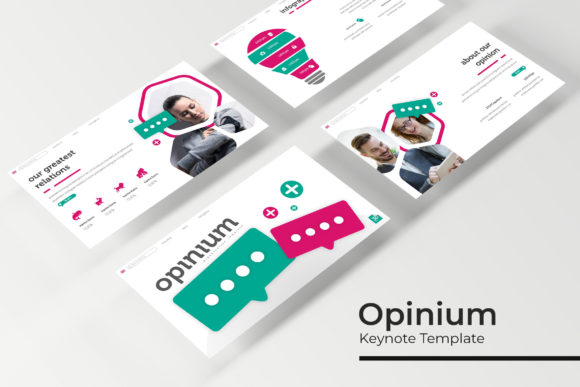
Transform Your Presentations with the Opinium Keynote Template
Standing in front of a boardroom or pitching to potential investors often comes down to how clearly you can communicate your value. A cluttered, poorly designed slide deck can distract from your message, while a professional, visually cohesive template ensures your ideas take center stage. If you're looking for a presentation tool that balances aesthetic appeal with practical functionality, the Opinium Keynote Template offers a robust solution for professionals across industries.
Why Visual Consistency Matters in Business Communication
Whether you're a startup founder pitching a new concept, a marketer outlining a campaign strategy, or an educator delivering a workshop, the visual language of your presentation speaks volumes before you say a word. Inconsistent colors, mismatched fonts, or cluttered layouts can undermine credibility. The Opinium template addresses this by providing 5 premade color themes, each containing 30 meticulously designed slides. This structure ensures every slide within your deck shares a unified visual identity, reinforcing your brand's professionalism without requiring advanced design skills.
Think about the last time you sat through a presentation where the speaker jumped between random color schemes or used clip art that looked outdated. It's distracting. With a template system like Opinium, you select one of the five color variations upfront, and every slide automatically maintains that palette. This consistency helps your audience focus on content rather than questioning your design choices.
Practical Applications Across Industries
The versatility of this template extends well beyond corporate boardrooms. Consider how different professionals might leverage its features:
- Brand Strategists: Use the gallery and portfolio slides to showcase brand identity projects, displaying logos, color palettes, and typography systems in a clean, organized format.
- Freelance Designers: Present client work using the handcrafted infographics, making data-driven narratives more digestible and visually engaging.
- Small Business Owners: Create investor pitch decks that look polished and credible, even without hiring a dedicated design team.
- Content Creators and Bloggers: Develop workshop materials or online course presentations that feel premium and worth the investment.
- Marketing Teams: Build campaign recaps, quarterly reports, or social media strategy decks that align with existing brand guidelines.
The inclusion of section break slides is particularly useful for longer presentations. These visual pauses give your audience a moment to absorb information while signaling a shift in topic. It's a small detail that dramatically improves the flow of any talk.
Design Features That Save Time Without Sacrificing Quality
One of the biggest challenges in presentation design is balancing speed with quality. You might have brilliant content, but if you're spending hours adjusting text boxes and aligning elements, you're losing valuable time. The Opinium template is built on master slides, which means every layout follows a consistent grid system. When you swap out placeholder images using the drag-and-drop feature, everything snaps into place without manual adjustments.
The pixel-perfect illustrations included in the template deserve attention. Rather than relying on generic stock graphics, these handcrafted infographics are designed to feel intentional and purposeful. Whether you're illustrating a workflow, comparing statistics, or mapping out a timeline, the visual assets complement the overall design language rather than clashing with it.
For those who frequently present on widescreen monitors or projectors, the template includes both standard and widescreen PPTX files. This dual-format approach means you don't need to worry about awkward cropping or letterboxing when switching between display setups.
Typography Choices That Support Readability
Good presentation design isn't just about visuals—it's about typography. The Opinium template uses a carefully selected free font, with download links included in the documentation. This is a practical choice that eliminates licensing headaches while ensuring your slides look consistent across devices. When text is legible from the back of a conference room, your message lands more effectively.
If you're building a brand identity system, the font pairings within the template can serve as a starting point. While the template itself is a presentation tool, the typographic principles it demonstrates—hierarchy, spacing, contrast—apply directly to other design contexts like packaging design, editorial layouts, and web design.
What's Actually Included in the Package
Transparency matters when investing in design assets. Here's what you receive with the Opinium Keynote Template:
- 5 PPTX Files (standard format)
- 5 PPTX Widescreen Files
- 5 Premade Color Themes (30 slides each, totaling 150+ slides)
- Handcrafted Infographics and section break slides
- Gallery and Portfolio Slide Layouts
- Resizable and Editable Graphics with picture placeholders
- Readme File with setup instructions
- Free Font Download Link
It's worth noting that the preview photographs and images are not included—they're used purely for illustration. This is standard practice with presentation templates, so plan to use your own imagery or source stock photos separately.
Tips for Getting the Most Out of Your Template
Simply downloading a template doesn't guarantee a great presentation. Here are some practical recommendations:
Start with your content outline. Before opening the file, map out your key messages. The template provides structure, but your narrative drives the presentation. Use the section break slides to organize major transitions in your story.
Customize the color themes thoughtfully. While the five premade options are designed to work out of the box, consider adjusting them to match your brand's specific hex codes. The master slide system makes this relatively straightforward—update the master, and every slide inherits the change.
Use the infographic slides for complex data. If you're presenting statistics, processes, or comparisons, resist the urge to dump raw numbers onto a blank slide. The handcrafted infographics are designed to make data accessible, so leverage them to tell a clearer story.
Test your presentation on the actual display. Colors can shift between screens, and text that looks fine on your laptop might be too small on a projector. Run through the deck on the equipment you'll use for the actual presentation.
Keep placeholder images proportional. The drag-and-drop picture placeholders are convenient, but stretching an image beyond its original aspect ratio will make it look distorted. Crop thoughtfully rather than forcing dimensions.
Commercial Use and Licensing Considerations
For designers and agencies, the ability to use templates for client work is essential. Review the specific licensing terms included with your purchase to understand whether commercial use is permitted and if there are restrictions on the number of projects. The included free font typically comes with its own license, so verify those terms separately if you plan to use the typeface beyond the presentation context—for example, in logo design or merchandise.
Building a library of reliable design assets like the Opinium template streamlines your workflow over time. Instead of starting from scratch with every new project, you have a professional foundation that can be adapted to different clients, industries, and audiences. That efficiency translates directly into more time for creative thinking and less time wrestling with slide layouts.
Whether you're preparing a keynote address, a client proposal, or an educational workshop, having a thoughtfully designed template at your disposal removes one significant variable from the equation. Your ideas deserve a presentation framework that supports them—and the Opinium Keynote Template delivers that foundation with enough flexibility to make each deck feel distinctly yours.