Mastering Visual Consistency with the Aeros Template Suite
We've all been there—staring at a blank presentation slide, cursor blinking, knowing the deck needs to look polished but lacking the time or design skills to build something from scratch. Whether you're pitching to investors, teaching a workshop, or sharing quarterly results, your slides need to communicate professionalism instantly. That's exactly where a well-constructed template system like the Aeros Google Slide Template steps in, removing the guesswork and letting you focus on what you actually want to say.
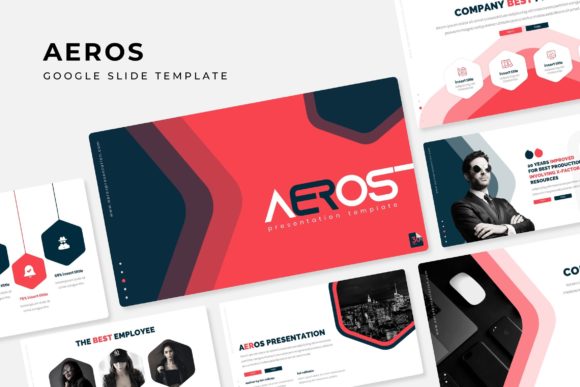
What sets this particular collection apart isn't just its visual appeal—it's the sheer scope of what's bundled together. With over 150 total slides spread across five premade color themes, you're getting a design toolkit that adapts to different moods, industries, and brand personalities without requiring you to manually recolor anything. Each color variation includes 30 thoughtfully designed slides, which means you can switch from a cool corporate blue palette to a warm, earthy tone in seconds. That kind of flexibility matters when you're juggling multiple clients or projects that each demand a distinct visual identity.
Why Structure Matters More Than You Think
A beautiful slide means nothing if the information falls flat. The Aeros template includes section break slides, gallery layouts, and portfolio pages that do more than look pretty—they organize your content in a way that guides your audience through a logical narrative. Think about the last presentation you sat through where the speaker jumped from topic to topic with no visual cues. Disorienting, right? Section breaks act as mental bookmarks, giving viewers a moment to reset before diving into the next idea.
For anyone building a brand identity or creating marketing assets, these structural elements are invaluable. A photographer can use the gallery slides to showcase a recent shoot. A consultant might rely on the infographic layouts to break down complex data into digestible visuals. A small business owner preparing for a trade show could pull together a product overview deck in an afternoon instead of a week. The template essentially gives you a professional framework that you fill with your own story.
Handcrafted Infographics and the Power of Visual Communication
Numbers and statistics rarely speak for themselves. People process visual information far faster than text, which is why the handcrafted infographics included in this set are worth highlighting. These aren't generic clip-art charts—they're carefully designed visual elements that make data feel approachable and memorable. Whether you're presenting sales figures, outlining a project timeline, or comparing product features, an infographic transforms dry information into something your audience actually absorbs.
This is particularly relevant for content creators and marketers who regularly repurpose presentation content across channels. A well-designed infographic slide can double as a standalone social media graphic, a blog header, or even a print handout. The Aeros Google Slide Template understands that modern workflows aren't linear—content moves between platforms, formats, and audiences, and your design assets need to keep up.
Practical Design Features That Save Real Time
One of the most underrated aspects of any template is how easy it is to actually use. The Aeros collection is built on master slides, which means every layout is connected to a centralized design system. Change a font on the master, and it updates across all related slides. Swap a color accent, and the entire deck shifts with it. This isn't just convenient—it's essential for maintaining visual consistency when you're working under tight deadlines.
The picture placeholders deserve special mention here. Instead of wrestling with image cropping and alignment, you simply drag and drop your photographs into pre-sized frames that snap into place. For anyone who's spent an hour trying to get three images to line up perfectly on a single slide, this feature alone justifies the investment. The graphics are also fully resizable and editable, so you're never locked into a specific dimension or style. Need a taller image? Stretch the placeholder. Want a different icon color? Adjust it directly in the slide editor.
Beyond Presentations: Unexpected Ways to Use These Slides
Here's something most people overlook when downloading a presentation template—it's not just for slides. Because the files come in PPTX format (including widescreen versions), they're compatible with a range of design workflows. You can export individual slides as high-resolution images for use in social media graphics, blog headers, website banners, or even print materials like posters and invitations. A single infographic slide, exported as a PNG, becomes a ready-made Pinterest pin or Instagram carousel frame.
Entrepreneurs and small business owners often don't have the budget for a dedicated designer, and that's perfectly fine. What matters is having access to design assets that look professional without requiring advanced skills. The Aeros template bridges that gap. You're not learning modern typography theory or studying font pairing principles—you're dragging your content into a pre-built layout that already looks cohesive. That's practical design thinking.
The pixel-perfect illustrations included in the set also elevate the overall quality. These aren't generic stock graphics—they're custom illustrations that add personality and depth to your slides. When combined with the five premade color themes, you get a visual language that feels intentional rather than improvised. For branding purposes, that distinction matters. Audiences can sense when something feels off or hastily assembled, even if they can't articulate why.
Getting Started and Making It Your Own
The download includes five PPTX files (both standard and widescreen), a readme document, and links to the free fonts used in the design. That last detail is important—nothing kills a polished presentation faster than a missing font that defaults to something generic. By pointing you to the exact typefaces used, the template ensures your slides look exactly like the preview from the moment you open the file.
A quick note on the preview images: the photographs shown in promotional materials are for illustration purposes and aren't included in the download. This is standard practice, but it's worth mentioning so there are no surprises. Bring your own images, and the drag-and-drop placeholders will handle the rest.
Whether you're preparing a client pitch, building a course, designing a portfolio, or creating internal documentation, having a reliable template system removes friction from the creative process. The Aeros collection gives you enough variety—150+ slides, five color palettes, infographics, galleries—to handle almost any presentation scenario without feeling repetitive. And because everything is editable, you can push the designs further as your skills and needs evolve. Sometimes the best creative tool isn't the most complicated one—it's the one you'll actually use.