Sorizek Power Point Template: A Visual Toolkit for Modern Presentations
Ever sat down to build a presentation, only to spend hours wrestling with alignment, color schemes, and trying to make generic slides look professional? You're not alone. A truly effective presentation does more than list facts; it tells a story visually, guiding your audience's attention and reinforcing your message with every slide. This is where a thoughtfully designed asset like the Sorizek Power Point Template shifts from being a nice-to-have to a genuine time-saver and brand-builder. It's not just a collection of slides; it's a structured system for creating visually cohesive and engaging narratives.
Beyond Basic Slides: The Anatomy of a Cohesive Visual System
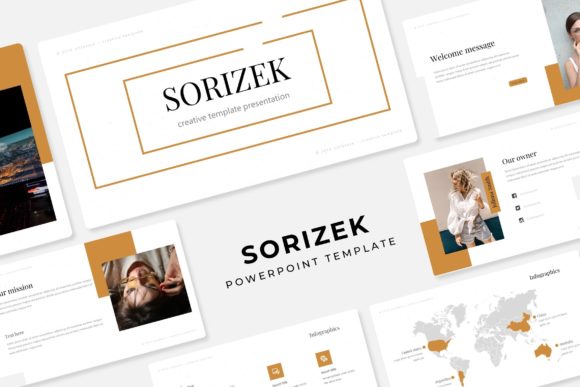
What sets a template like Sorizek apart is its foundation in design principles, not just decorative elements. The inclusion of 150+ total slides across five premade color palettes is the starting point. Each of the five color variations offers 30 meticulously crafted slides, meaning you're not just getting one look—you're getting five distinct, ready-to-use brand moods. This is incredibly useful for agencies or entrepreneurs managing multiple clients or product lines. You can maintain a consistent visual language for each without starting from scratch.
The handcrafted infographics are where data meets design. Instead of clunky, default chart styles, these infographics are built to make complex information digestible and visually appealing. Paired with dedicated section break slides, they allow you to segment your talk logically, giving your audience mental breathing room and keeping the narrative flow clear. The gallery and portfolio slides are particularly valuable for creatives—photographers, designers, or consultants—who need to showcase work in a clean, impactful format that doesn't distract from the projects themselves.
Practical Design Meets Everyday Workflow
Functionality is where many beautiful templates fall short. Sorizek addresses this with features built for real-world use. The resizable and editable graphics ensure that you're never stuck with a pie chart that's too small or an icon that doesn't fit your layout. The picture placeholders with drag-and-drop functionality are a game-changer for efficiency. Instead of manually cropping and positioning every image, you simply drag your photo into the placeholder, and it fits perfectly. This simple feature can cut slide preparation time in half.
Being based on master slides is another critical, professional-grade feature. It means you can make a global change—like adjusting the primary color or updating a font family—across the entire presentation with just a few clicks. This guarantees visual consistency, which is a cornerstone of professional branding and clear communication. The pixel-perfect illustrations ensure that whether you're presenting on a small laptop screen or a large conference projector, every element looks crisp and intentional.
From Corporate Pitches to Creative Portfolios
The versatility of a well-structured template system extends far beyond a standard boardroom pitch. Consider its application across different projects. A small business owner could use the "Sorizek Power Point Template" to create a consistent brand identity across a investor deck, a social media strategy outline for a client, and a product launch proposal. The five color variations allow for easy adaptation to different brand guidelines or seasonal campaigns.
For content creators and marketers, the template becomes a hub for visual assets. The infographic slides are perfect for breaking down blog post statistics or social media performance for a report. The portfolio slides can be repurposed to create a digital lookbook or a service menu. Even for personal projects, like planning a community event or outlining a personal brand, the structured approach helps organize thoughts visually, making the end result more persuasive and professional.
Integrating Typography and Finalizing Your Asset
While the template provides the structural and visual foundation, the typography you pair with it completes the story. The included readme file, with a link to download the free font used in the preview, is a helpful starting point. This gives you the exact look from the showcase. However, the clean, modern design of the slides also provides a neutral enough canvas for other complementary fonts. When choosing, consider the mood of your project: a clean sans-serif for a tech startup pitch, a elegant serif for a luxury brand proposal, or a friendly script for a creative workshop invitation.
It's important to remember, as noted in the template details, that the photographs used in the preview are for illustration only. This is a standard and important practice, as it encourages you to use your own imagery, which is crucial for authenticity and branding. Using your own team photos, product shots, or custom graphics makes the presentation truly yours. Before finalizing, always review the licensing to ensure it covers your intended use, whether for client work, commercial projects, or internal presentations.
Ultimately, a resource like the Sorizek template is about removing friction from the creative process. It handles the heavy lifting of layout, alignment, and visual harmony, freeing you up to focus on what really matters: your message, your content, and connecting with your audience. It’s a practical toolkit designed to help you communicate more effectively, whether you’re closing a deal, teaching a concept, or sharing a vision.