Fedix Google Slide Template: A Versatile Design Toolkit
Imagine you've spent hours crafting the perfect presentation for a client pitch or a workshop. You've nailed the content, but the slides feel disjointed—some charts look homemade, others have mismatched fonts, and the color palette shifts awkwardly from one section to the next. This kind of inconsistency can distract your audience and undermine your credibility. A cohesive visual system isn't just about looking polished; it's about communicating your ideas with clarity and authority. That's where a thoughtfully built template kit becomes invaluable.
Beyond a Single Template: A Complete Visual System
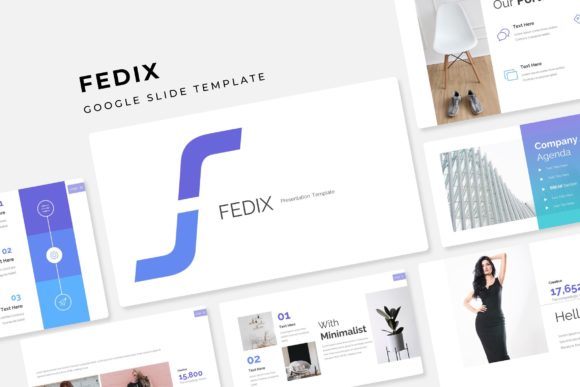
The Fedix Google Slide Template isn't just a single file to download and use. It's a comprehensive presentation ecosystem designed for flexibility. The package includes 150+ total slides, organized into five distinct color variations, with 30 unique slide layouts per color. This structure means you're not starting from scratch each time. Whether you're presenting quarterly results, launching a new product, or teaching a class, you have a library of professionally designed layouts at your fingertips. The consistency across these slides—from section breaks to portfolio showcases—ensures your entire presentation tells a unified visual story.
What truly sets this kit apart is its attention to practical workflow details. Every graphic element is resizable and editable, built on master slides for effortless global changes. Picture placeholders use a simple drag-and-drop interface, saving you from tedious resizing and cropping. The handcrafted infographics aren't just decorative; they're designed to transform complex data into clear, engaging visual narratives. This isn't about forcing your content into a rigid mold—it's about providing a flexible framework that adapts to your message.
Practical Applications for Real Projects
Let's explore how this template system solves everyday design challenges. For small business owners, maintaining brand consistency across presentations, proposals, and social media graphics can be a constant struggle. Using the Fedix template's color variations, you can create a set of presentation decks that all feel unmistakably "you," reinforcing your brand identity with every slide. The pixel-perfect illustrations and clean typography ensure your materials look professional, whether they're displayed on a conference screen or viewed on a phone.
Content creators and marketers will appreciate the portfolio and gallery slides. Instead of cramming work samples into a generic layout, you can showcase projects in a visually compelling way that highlights your skills. The section break slides provide natural breathing room in longer presentations, guiding your audience through your narrative without visual fatigue. For educators and speakers, the structured layouts help organize information logically, making complex topics easier to follow. Even for personal projects—like planning a wedding or organizing a community event—the template's versatility allows you to create beautiful, informative materials without needing advanced design skills.
Design Principles at Work
Good design is invisible when it works well. The Fedix template embodies several key principles that make your communication more effective. The consistent use of typography and color across all 150+ slides creates visual harmony, which builds trust with your audience. When your slides look intentionally designed, people perceive your content as more credible. The clean, modern aesthetic avoids trendy gimmicks that might date quickly, ensuring your presentations remain relevant over time.
The template also demonstrates thoughtful information hierarchy. Different slide layouts are optimized for different types of content—some emphasize text, others showcase images, and still others present data visually. This variety prevents monotony while maintaining cohesion. The included readme file and font download links show attention to the practical details that matter when you're actually using the template. You won't waste time hunting for missing assets or figuring out how to edit elements.
Making It Your Own
While the template provides a strong foundation, its real value emerges when you customize it to fit your specific needs. Start by selecting the color variation that best aligns with your brand or the mood of your presentation. Then, explore the different slide layouts to find the ones that best serve your content. Don't feel obligated to use every slide—curate the ones that tell your story most effectively.
Experiment with the infographic options to visualize data in fresh ways. Try different photo placeholder arrangements to see how images interact with your text. Because everything is built on master slides, you can make global adjustments to fonts, colors, and logos with just a few clicks. This flexibility means the template grows with you. As your brand evolves or your presentation needs change, you can adapt the same kit rather than starting over with a new template each time.
Considering the Complete Package
When evaluating any design asset, it's wise to consider what's included beyond the surface features. The Fedix package comes with five PPTX files in widescreen format, covering each color variation. The inclusion of free font download links removes a common frustration—tracking down compatible typefaces. The note about preview images not being included is a helpful transparency that sets realistic expectations.
For those concerned about commercial use, always verify the licensing terms for any template or font you use in client work or merchandise. While this kit appears designed for professional use, taking a moment to review the readme file ensures you're using it appropriately. The true measure of a template's value isn't just its visual appeal, but how seamlessly it integrates into your workflow and helps you communicate more effectively. A well-chosen template like this one becomes less of a shortcut and more of a strategic tool—helping you present your ideas with the professionalism and clarity they deserve.