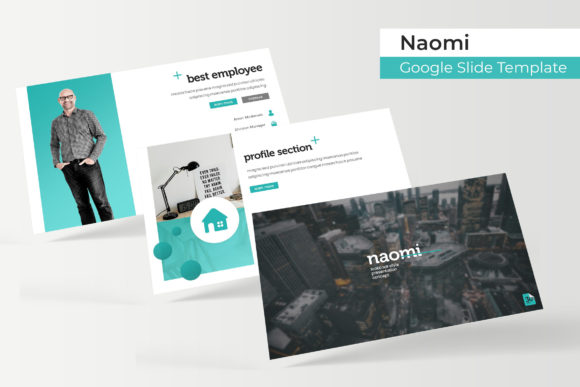
Naomi Google Slides Template: A Versatile Design Toolkit
You've been there. The meeting is tomorrow, the presentation is due, and staring back at you is a blank slide deck and a cursor blinking with judgment. The default templates feel tired, the color schemes are uninspired, and the thought of building a professional, cohesive deck from scratch is daunting. What if you had a starting point that wasn't just a collection of slides, but a complete visual system? This is where a thoughtfully constructed asset like the Naomi Google Slide Template moves beyond being a simple file and becomes a genuine creative partner.
At its core, Naomi is built on a philosophy of structured flexibility. It arrives not as one monolithic file, but as five distinct presentations, each in a different premade color palette. This immediately solves a critical branding challenge: visual consistency. Whether you're a freelancer juggling multiple clients, a small business with different product lines, or a content creator with varied project themes, having five coordinated color schemes ready to go means your decks will always look intentionally designed, never cobbled together. Each color variation contains 30 meticulously crafted slides, totaling over 150 unique layouts. This isn't about quantity for its own sake; it's about having the right slide for every possible narrative beat in your story.
Beyond Bullet Points: The Anatomy of a Useful Slide Deck
The real value of a template like Naomi lies in its component parts, each designed to solve specific communication problems. Let's unpack what makes it a practical tool for daily work.
Handcrafted Infographics: Data and processes are the backbone of many presentations, but they're often presented in dry, forgettable ways. Naomi includes a suite of custom-designed infographics—think clean charts, step-by-step process flows, comparison grids, and timeline visuals. These aren't generic clip art. They're designed to make complex information digestible and visually engaging, helping your audience grasp and retain key points.
Section Break Slides: A great presentation has rhythm. These dedicated divider slides act as visual pauses, allowing you to introduce new chapters of your story clearly. They provide a moment for your audience to reset, and for you to guide them smoothly from one idea to the next, preventing the "wall of text" fatigue.
Gallery and Portfolio Slides: For designers, photographers, artists, or any business showcasing work, these layouts are essential. They offer structured yet elegant ways to display images, case studies, product shots, or client testimonials. The grid and gallery formats are carefully balanced to ensure the visual content remains the hero.
Pixel-Perfect Illustrations & Editable Graphics: Every element, from icons to decorative shapes, is crafted with precision. More importantly, they are fully editable. You can resize them without loss of quality, change their colors to match your brand, and reposition them freely. The graphic picture placeholders are a standout feature—they use a simple drag-and-drop mechanism, allowing you to insert your own images directly into shaped frames (like circles, rounded rectangles, or abstract shapes) with a single click. This ensures a polished, professional look every time, without fiddling with cropping and alignment.
Master Slide Foundation: The entire template is built upon a robust Master Slide system. This is the technical backbone that ensures consistency. When you change a font style, color, or logo on the master, it updates globally across all 150+ slides. This saves an enormous amount of time and eliminates the risk of inconsistent formatting, which is a common pitfall in collaborative or lengthy projects.
From Slide Decks to Brand Ecosystems: Unexpected Applications
While "Google Slides Template" is in the name, limiting Naomi to just presentations would be a missed opportunity. The assets included—particularly the cohesive color palettes, professional typography pairings (with a free font link provided), and versatile graphic elements—can seed a much broader brand identity.
Consider these practical applications:
- Social Media Graphics: Use the infographic layouts as inspiration for carousels on Instagram or LinkedIn. The color schemes and icon styles can be directly translated into post templates for a consistent feed.
- Marketing Materials: Pull the section break slides to create striking headers for PDFs, reports, or digital brochures. The portfolio layouts can become the basis for a sleek digital lookbook.
- Internal Documents: Apply the clean, structured design to internal guides, onboarding documents, or team newsletters. This elevates everyday materials, reinforcing a culture of professionalism.
- Website & Blog Assets: The color palettes and graphic styles can inform your website's visual language. Use the illustrated icons for blog post featured images or to break up text in articles.
- Pitch Decks & Proposals: The combination of data visualization slides, team bios, and timeline graphics makes Naomi exceptionally well-suited for creating persuasive investor pitches or client proposals where clarity and professionalism are paramount.
Practical Advice for Integrating a Template into Your Workflow
Adopting a new design asset is most effective when done intentionally. Here’s how to make a template like Naomi work for you, not against you.
Start with Structure, Not Style: Before you even think about colors, outline your presentation's narrative. What is the core message? What are the key sections? Use the variety of slide types—title, content, quote, infographic, gallery—as a menu to build your story's skeleton first.
Customize with Purpose: The five color schemes are a starting point, not a limitation. Use the master slides to input your own brand's primary and secondary colors. Swap out the provided fonts (the readme file will point you to the free download) with your own brand typefaces if needed. The goal is to make the template a vessel for your brand, not the other way around.
Leverage the Placeholder System: The drag-and-drop image placeholders are your best friend. Commit to using them for all imagery. This single habit will ensure your photos and graphics are uniformly styled and aligned, which is a hallmark of professional design.
Think in Systems: Don't just use one slide. When you find a layout you like—say, a two-column comparison slide—consider using its visual style (the font treatment, the color accent, the icon style) to inspire other content elsewhere. This creates deep visual harmony throughout your project.
Check the Licensing: A crucial but often overlooked step. The included readme file will detail the terms of use. Typically, assets like these are licensed for both personal and commercial projects, allowing you to use them in client work, for your business, or for products you sell. Confirming this upfront ensures you can use the assets with full confidence.
The true test of any design asset is whether it gets used. A template that's overly complex or stylistically rigid will gather digital dust. Naomi's strength is in its balance—it provides enough structure to guide and enough flexibility to adapt. It acknowledges that a presentation isn't just a set of slides; it's a tool for communication, persuasion, and storytelling. By handling the heavy lifting of visual consistency and layout, it frees you up to focus on what truly matters: your message, your audience, and the impact you want to make.