Why the Rejected Template Might Be Your Best Presentation Yet
You know that feeling when you’re staring at a blank slide deck, and the deadline is looming? I’ve been there. We all have. The right presentation template doesn’t just save time; it changes the entire energy of your project. That’s why I was initially skeptical when I first heard about the "Rejected" Google Slides template. The name sounds like something you’d avoid, right? But after digging into its features, I realized the irony: this template might be the most comprehensive, professional, and versatile design asset you haven’t added to your toolkit yet.
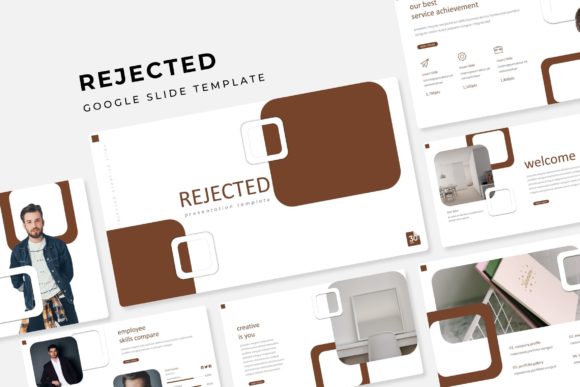
At its core, the Rejected template is a powerhouse of organization and visual clarity. With over 150 total slides, it’s built for people who have a lot to say but don’t want their audience drowning in clutter. It’s not just about quantity, though. Every slide is designed with pixel-perfect illustrations and follows a master slide structure, which means you’re working with a foundation that’s already cohesive. You’re not just getting slides; you’re getting a visual system. Whether you’re a designer prepping a client pitch, a small business owner outlining a new service, or a marketer building a brand deck, this kind of structure is a game-changer.
More Than Just Slides: A Toolkit for Visual Consistency
One of the biggest challenges in any presentation is maintaining a consistent look from the first slide to the last. It’s easy to start strong and then devolve into a mishmash of mismatched fonts and awkwardly cropped images. This is where the Rejected template’s design really shines. It comes in five premade color variations, with 30 slides dedicated to each color scheme. That means you can choose a palette that aligns with your brand identity right out of the box, and every single slide will feel intentionally designed.
The inclusion of handcrafted infographics and section break slides is particularly useful. We’ve all sat through presentations where the data slides feel like an afterthought. Here, the infographics are built to be both beautiful and functional, helping you transform complex information into digestible, engaging visuals. The gallery and portfolio slides are another standout feature. For photographers, artists, consultants, or any creative professional, having a dedicated, elegantly designed space to showcase your work within a presentation is invaluable. It turns a simple report into a compelling narrative about your capabilities.
And let’s talk about practicality. The template is fully resizable and editable, with graphic picture placeholders that use a simple drag-and-drop function. This isn’t just a nice-to-have; it’s essential for anyone who values their time. You can swap out images, adjust colors, and move elements without breaking the underlying design. It’s built on master slides, which means one change can propagate throughout the entire deck, ensuring that pixel-perfect look is maintained no matter how much you customize.
Practical Applications for Your Business and Creative Projects
So, who is this actually for? The short answer is almost anyone who needs to communicate ideas visually. Let’s break it down.
If you’re a small business owner or entrepreneur, this template is perfect for investor pitches, internal team meetings, or client onboarding. You can use the portfolio slides to highlight past projects, the infographics to explain your process, and the clean layouts to present financials or market analysis. It helps you look established and professional, which builds trust before you even say a word.
For designers and agencies, the Rejected template can serve as a starting point for client work. Instead of building every deck from scratch, you can customize these high-quality slides to fit a client’s branding, saving hours of work. The consistent structure ensures your deliverables always meet a high standard of visual communication.
Content creators, marketers, and bloggers will find it incredibly useful for creating webinar decks, workshop materials, or even visual guides for social media. The clean, modern typography and layout make information easy to follow, which is key for audience engagement. You could even repurpose individual slide designs as standalone graphics for Instagram or LinkedIn, maintaining brand consistency across platforms.
Even if you’re working on something less corporate, like a school project, a community initiative, or a personal creative portfolio, the versatility of this template adapts. The five color variations give you enough flexibility to match different moods or themes, and the editable graphics mean you can infuse it with your personal style.
What’s Actually in the Box? A Look at the Deliverables
Transparency is key when investing in design assets, so let’s look at what you’re getting. The package includes:
- 5 PPTX Files in the standard PowerPoint format.
- 5 PPTX Widescreen files, optimized for modern displays.
- 5 premade color schemes, each with its own set of 30 slides.
- A Readme First document to get you started quickly.
- Font used (free font download link included), so you can perfectly replicate the look without hunting for typefaces.
It’s important to note the disclaimer: all photographs or pictures used in the preview are for illustration purposes only and are not included. This is standard practice. It means you’ll need to use your own images or source stock photos, but the placeholders make this process straightforward. The real value is in the design framework itself—the layouts, the typography, the infographic structures.
Final Thoughts on Choosing Your Next Presentation Asset
Presentation design is a form of visual storytelling. A great template gives you the stage, the lighting, and the set design, so you can focus on delivering your message. The Rejected Google Slide Template, despite its name, is a robust and thoughtfully constructed tool for that purpose. Its strength lies in its blend of comprehensive features—like master slides and handcrafted infographics—and its practical, user-friendly customization.
When you’re evaluating any design asset, think about your specific needs. Do you need consistency across a large team? The master slide system has you covered. Are you presenting data-heavy content? The infographics will be your best friend. Is visual branding critical? The premade color schemes provide a solid starting point. This template isn’t just about making pretty slides; it’s about making your communication more effective, more professional, and ultimately, more engaging for your audience. Sometimes, the most useful tools are the ones that don’t overpromise but simply deliver a solid, reliable foundation for your ideas to shine.