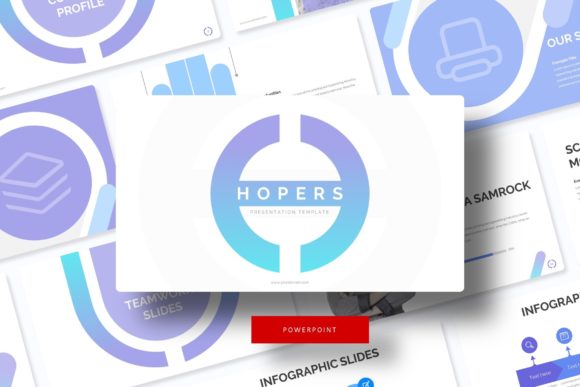
Unlock Dynamic Presentations with the Hopers PowerPoint Template
There's a unique frustration that comes with opening a blank PowerPoint slide. You have a brilliant idea, a compelling story, or a crucial business update, but the default templates feel sterile and uninspired. You spend hours wrestling with alignment, color schemes, and generic clip art, only to end up with a presentation that looks like everyone else's. This is where a thoughtfully designed asset like the Hopers PowerPoint Template shifts from being a nice-to-have to a genuine productivity tool. It’s not just about having pre-made slides; it’s about having a cohesive visual system at your fingertips that lets you focus on your message rather than formatting battles.
A Foundation for Cohesive Brand Storytelling
Visual consistency is the bedrock of professional communication. Whether you're a startup founder pitching to investors, a marketer outlining a quarterly strategy, or a teacher designing a lesson plan, disjointed slides undermine your credibility. The Hopers template addresses this by providing a structured yet flexible framework. With 150+ total slides built upon Master Slides, you're not just getting individual pages; you're getting an integrated design language. Every element, from the handcrafted infographics to the section break slides, is designed to work together seamlessly. This means your color palette, typography, and graphic style remain uniform throughout, reinforcing your brand identity with every click.
The inclusion of five premade color variations is particularly strategic. Instead of one-size-fits-all, you have curated palettes that can align with different brand guidelines or project moods. Need a vibrant, energetic look for a product launch? There's a color scheme for that. A more subdued, corporate tone for an internal report? Another scheme awaits. Each of the five PPTX files contains 30 meticulously designed slides, giving you a robust starting point that can be adapted to countless scenarios. This kind of built-in versatility is what separates a premium design asset from a basic template download.
Practical Design Meets Effortless Customization
The true test of any design template is its usability. A beautiful slide that's impossible to edit becomes a hindrance. Hopers is built with practical workflow in mind. The pixel-perfect illustrations and resizable, editable graphics ensure that visual quality isn't sacrificed when you need to make changes. The picture placeholder drag & drop feature is a massive time-saver. Instead of manually cropping and positioning images, you simply drag your photo into the designated area, and it scales and fits perfectly within the pre-designed frame. This intuitive functionality is a game-changer for anyone who isn't a PowerPoint expert but needs to produce professional results quickly.
Consider the applications beyond a standard slide deck. The gallery and portfolio slides are ideal for creatives. A photographer could showcase a series of images, a designer could present client work, or a blogger could compile visual inspiration. The section break slides provide visual punctuation, making long presentations easier to follow and helping to demarcate different chapters of your narrative. For small business owners, these templates can be repurposed into everything from employee training manuals to client onboarding guides, ensuring every touchpoint looks polished and intentional.
Streamlining Your Creative and Business Workflow
Time is the most valuable resource for entrepreneurs and creators. The hours saved not having to design charts from scratch or hunt for matching icons can be redirected toward strategy, content creation, or client work. Hopers functions as a design asset that accelerates your workflow. The infographic slides are ready-made for visualizing data—turn complex statistics into engaging visuals for a blog post, a social media carousel, or an investor update. The consistent structure also aids in visual consistency across different projects. A marketing team can use the same template for internal brainstorming, client presentations, and social media content planning, ensuring all communications feel unified.
For those involved in editorial layouts or digital products, the template's clean aesthetic and modular design offer a foundation for creating lookbooks, media kits, or digital course materials. The readme file and included free font download links remove guesswork, allowing you to get started immediately without worrying about licensing for the core typography. This attention to detail demonstrates an understanding of the end-user's needs, from the initial setup to the final presentation.
Integrating into Your Brand's Visual Toolkit
Think of the Hopers template not as a one-off tool, but as a component within your broader brand identity system. The colors, shapes, and layout principles can inspire other materials. The clean lines of the graphic elements might influence your logo design explorations. The balanced typography could guide your web design or packaging design choices. By using a cohesive template for presentations, you're reinforcing the same visual language that should appear on your social media graphics, print materials, and merchandise.
Ultimately, a tool like this empowers you to communicate with greater clarity and confidence. It removes the technical barriers to good design, allowing your ideas to take center stage. Whether you're crafting a keynote, a workshop, a proposal, or a visual report, having a reliable, adaptable, and visually compelling framework like the Hopers PowerPoint Template means you're always ready to present your best work.