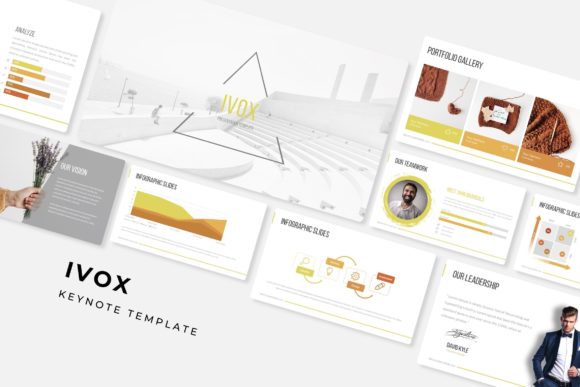
Streamline Your Slides with the Ivox Keynote Template
You know the feeling. You’ve got a big pitch, a quarterly review, or a workshop coming up, and the thought of starting a presentation from scratch makes you want to close your laptop. We’ve all been there—staring at a blank slide, wrestling with alignment, and trying to make a generic template look like it was made for your brand. It’s a time sink, and honestly, it rarely looks as polished as you’d like. That’s where a well-structured template system like the Ivox Keynote Template comes in, designed to cut through that friction and give you a professional starting point that actually feels finished.
A Foundation for Visual Consistency and Brand Recognition
One of the biggest challenges in presentation design is maintaining a cohesive look across dozens of slides. It’s easy for colors to drift, for font sizes to change, and for the overall aesthetic to feel disjointed. This inconsistency can subtly undermine your message and make your brand appear less professional. The Ivox Keynote Template tackles this head-on by providing a master slide system. This means every slide you build is based on a carefully crafted foundation, ensuring your typography, color palette, and layout remain uniform from the first slide to the last. For anyone building a brand identity—whether you’re a startup founder, a freelance designer, or a marketing manager—this kind of built-in discipline is invaluable. It helps reinforce brand recognition every time you present, making your materials instantly identifiable to your audience.
The template pack includes five premade color schemes, each with 30 thoughtfully designed slides. This isn’t just about slapping a new hue onto the same old layout. Each color variation has been handcrafted to ensure contrast, readability, and visual harmony. You can select the palette that best aligns with your existing brand guidelines or choose one that sets the right mood for your specific topic—perhaps a bold, energetic scheme for a product launch or a more subdued, professional one for a financial report. This flexibility saves you the guesswork and potential missteps of trying to create your own color combinations from scratch.
Designed for Real-World Use, Not Just for Show
Let’s talk about practicality. A beautiful template is useless if it’s a nightmare to edit. The Ivox system is built on a drag-and-drop, placeholder-based approach. Need to swap out a stock photo for your own team shot? Simply drag your image into the designated placeholder, and it automatically scales and crops to fit the design perfectly. No more fiddling with crop tools or struggling to get images to align. This is a massive time-saver, especially when you’re working against a deadline.
The included handcrafted infographics are a standout feature. Instead of searching for generic chart icons or trying to build data visualizations from basic shapes, you get access to a library of professionally designed elements. These aren’t just decorative; they’re tools for communication. You can use them to illustrate processes, display statistics, or break down complex information in a way that’s engaging and easy to understand. For educators, consultants, or anyone who needs to present data regularly, this elevates your slides from simple bullet points to compelling visual stories.
Furthermore, the template includes dedicated section break slides and a gallery/portfolio slide layout. The section breaks provide a clean, visual pause in your presentation, helping to organize your content and guide your audience through different chapters of your talk. The portfolio slide is perfect for creatives—photographers, architects, designers—who need to showcase their work in a clean, grid-based format that highlights each project without clutter.
Maximizing the Impact of Your Presentation Assets
Think about the last presentation that truly held your attention. It likely had a clear visual hierarchy, used whitespace effectively, and didn’t overwhelm you with text. The pixel-perfect illustrations and resizable graphics in the Ivox Keynote Template are designed with these principles in mind. Because every element is editable and scalable, you can adjust the layout to emphasize what matters most—whether that’s a key statistic, a powerful quote, or a product image. This control over visual hierarchy is crucial for audience engagement. You direct their eyes to the most important information, making your message more memorable and impactful.
This level of polish extends to all your marketing assets. The same visual language you develop in your Ivox presentation can seamlessly translate to your social media graphics, website banners, or print materials. Using consistent design elements across platforms strengthens your brand identity. When a client sees your sleek slide deck and then encounters a matching infographic on your Instagram or a similarly styled one-pager, it creates a unified and professional impression that builds trust.
Getting Started and Making It Your Own
The package comes with five PPTX files—both standard and widescreen formats—along with a readme file and links to download the free fonts used in the design. A quick pro-tip: always review the readme first. It often contains simple instructions that can save you a lot of time. Installing the recommended fonts is key to ensuring the template looks exactly as intended from the moment you open it.
While the template provides a stunning starting point, the real magic happens when you make it yours. Don’t just fill in the blanks. Use the structure as a guide to refine your content. The master slides allow you to make global changes easily. Want to try a different accent color? Change it once on the master slide, and it updates across your entire deck. This non-destructive editing workflow encourages experimentation and lets you iterate quickly on your design.
Remember, the goal is clear communication, not just decoration. Choose the color scheme that best serves your content’s tone. Use the infographic elements to clarify, not complicate. Leverage the portfolio layout to tell a story about your work. By thinking of the Ivox Keynote Template not as a finished product but as a powerful design toolkit, you can create presentations that are not only visually stunning but also strategically effective, saving you hours of work and significantly elevating the professionalism of your visual communication.