Streamline Your Next Pitch with the Duplicated Keynote Template
Staring at a blank slide deck can be paralyzing. You have the data, the story, and the drive to present your idea, but the visual framework feels like a mountain to climb. You need something professional, cohesive, and visually engaging without spending hours aligning text boxes or choosing color palettes. This is where a robust, pre-built framework becomes a game-changer. The Duplicated Keynote Template offers a solution designed to eliminate that initial friction, providing a structured yet flexible foundation for any presentation.
A Foundation Built for Speed and Clarity
At its core, this template is engineered for efficiency. With over 150 total slides organized into five distinct color themes, you’re not just getting a single look—you’re getting a versatile toolkit. Each of the five premade color variations contains 30 meticulously designed slides. This means you can switch the entire mood of your presentation with a single click, ensuring your visual tone aligns perfectly with your brand or message. The slides are built on master slides, which guarantees pixel-perfect consistency across every page. Change a font, update a color, or adjust a layout element on the master, and the change cascades throughout your entire presentation. This master-slide foundation is what makes the template so powerful for maintaining visual integrity, especially in longer, more complex decks.
More Than Slides: A Visual Communication Toolkit
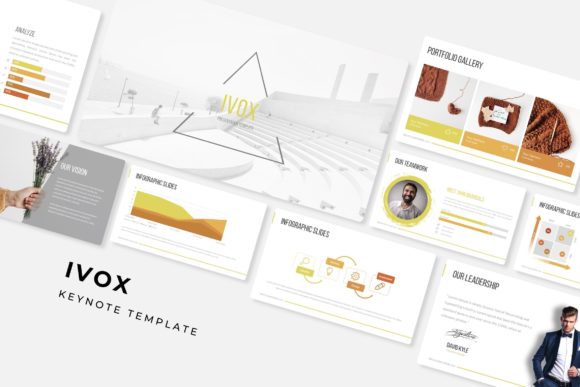
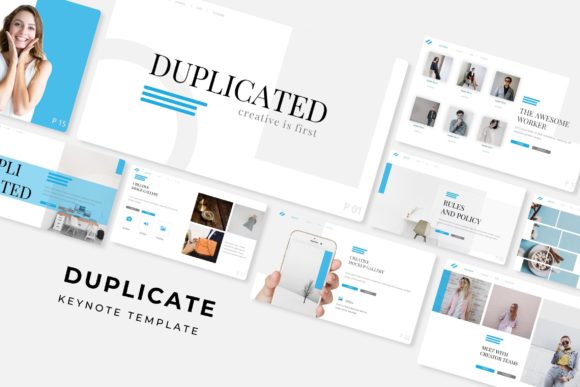
What truly sets this resource apart is its inclusion of handcrafted infographic elements. Effective data presentation isn’t about dumping numbers onto a slide; it’s about telling a story with that data. The pre-designed infographics within the Duplicated Keynote Template provide a starting point for visualizing processes, timelines, comparisons, and statistics in a way that is immediately understandable and aesthetically pleasing. These aren’t generic clipart icons; they are integrated graphic components designed to work seamlessly with the overall template style.
Beyond data visualization, the template includes dedicated section break slides and gallery/portfolio slides. The section breaks act as visual chapter markers, helping your audience follow the narrative arc of your presentation. They provide a mental pause and reset, preventing information overload. The gallery and portfolio slides are meticulously laid out grids, perfect for showcasing product images, team photos, case study visuals, or project samples. The picture placeholders are fully resizable and editable, utilizing a simple drag-and-drop functionality that lets you insert your own images in seconds, perfectly framed and formatted.
Practical Applications for Real-World Projects
The utility of a comprehensive presentation template like this extends far beyond a quarterly business review. Consider its application across various professional scenarios:
- Brand Pitches and Guidelines: Use the consistent slide master to present brand identity elements—logo usage, color palettes, and typography—in a clean, authoritative manner. The color variations can even be used to demonstrate different brand sub-identities or campaign themes.
- Marketing and Sales Decks: Quickly assemble compelling sales pitches or marketing strategy presentations. The infographic slides are ideal for illustrating customer journeys, sales funnels, or campaign performance metrics.
- Startup Investor Pitches: First impressions are critical. A polished, well-structured deck signals professionalism and attention to detail. The widescreen (PPTX) format is modern and fills contemporary displays, creating an immersive experience for potential investors.
- Educational and Training Materials: For educators, trainers, or workshop facilitators, the template provides a clean canvas for instructional content. The section breaks help organize lessons or modules logically.
- Project Proposals and Reports: Transform dry project updates or proposals into engaging narratives. Use the portfolio slides to highlight past successes or visualize project phases.
- Social Media Content Strategy: Plan and present a content calendar or social media strategy visually. The grid layouts are perfect for mocking up Instagram feeds or planning post series.
Key Features for a Polished Result
The technical specifications of the Duplicated Keynote Template are designed with the end-user in mind. The package includes five PPTX files (standard and widescreen) for each color theme, ensuring compatibility and format flexibility. The use of free fonts is a significant practical advantage; the included readme file provides direct download links, so you won’t encounter missing font errors or need to purchase expensive typefaces to make the template work. This thoughtful inclusion removes a common barrier to immediate use.
It’s important to note that while the template provides a stunning visual framework, the preview images used for demonstration are not included. This is standard practice, as it encourages users to insert their own authentic photography and branding materials, which is the key to making the template truly yours. The resizable and editable graphics mean you can adapt every element to your specific needs, whether you’re adjusting an infographic to reflect unique data or resizing a picture placeholder for a non-standard image.
Integrating the Template into Your Design Workflow
For designers and content creators, this template can serve as a foundational design asset. It’s not about replacing custom design work but accelerating it. You can use the structure and pre-built elements as a starting point, then customize fonts, colors, and layouts to match a client’s specific brand guidelines. The master-slide system makes this customization efficient and error-proof.
When selecting a template, consider its visual personality. Does the style align with your project’s goals? The five color variations in this package offer a range of tones, from bold and energetic to subdued and professional. Test how your own brand colors and imagery interact with the template’s palette. A good template should feel like a supportive canvas, not a restrictive cage. The clean, modern typography and ample white space in the Duplicated Keynote Template ensure that your content remains the star of the show, enhancing readability and audience engagement rather than distracting from it.
Ultimately, the value of a tool like this lies in its ability to save time, reduce decision fatigue, and elevate the quality of your visual communication. It’s a practical resource for anyone who needs to present ideas with clarity and confidence, allowing you to focus on the substance of your message while trusting that the visual delivery is polished and professional. By handling the structural and aesthetic heavy lifting, it empowers you to craft presentations that not only inform but also resonate and persuade.