Opinium: The Modern Presentation Template for Your Brand
You know the feeling. You’re preparing for a crucial pitch, a workshop, or a webinar, and you open your slide deck software only to stare at a blank, white canvas. The default templates feel stale, and the thought of building a visually cohesive presentation from scratch is daunting. This is where the right design asset becomes more than just a download—it becomes a creative partner. The Opinium Google Slide Template is designed to fill that role, offering a robust and visually striking foundation for anyone who needs to communicate ideas with clarity and professional polish.
A Foundation Built for Visual Impact and Efficiency
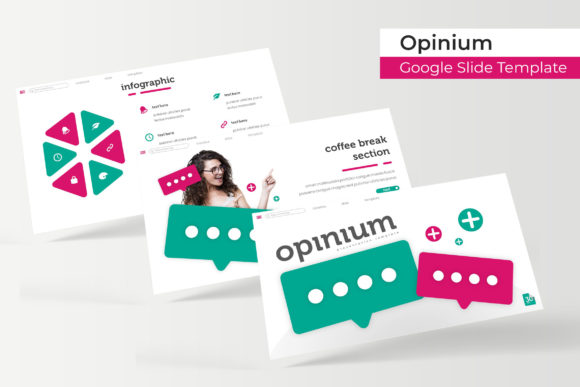
What immediately sets this presentation toolkit apart is its sheer scope and thoughtful organization. We’re not talking about a handful of slides. With 150+ total slides built upon a clean Master Slides architecture, it provides a comprehensive library of layouts. The structure is brilliant in its practicality: 5 premade color palettes, each containing 30 slides. This means you can select a color scheme that aligns with your brand guidelines and instantly have a full suite of coordinated slides ready to go. The 5 Color Variation system ensures your deck feels intentional and cohesive from the first slide to the last, eliminating the visual dissonance that comes from mixing and matching mismatched elements.
Beyond the color system, the template is packed with features that streamline the design process. The handcrafted infographic elements are a standout, allowing you to transform complex data into engaging visual stories. Dedicated Section Break Slides help organize your narrative, while the Gallery and Portfolio slide layouts are perfect for creatives and agencies needing to showcase work. Every graphic is Resizable and Editable, and the Picture Placeholder functionality is a game-changer. Instead of tedious cropping and fitting, you simply drag & drop your images into the designated frames, and they conform perfectly to the design. This pixel-perfect attention to detail saves hours and guarantees a pixel-perfect output, whether you're presenting on a large screen or sharing a PDF.
More Than Slides: A Toolkit for Brand Consistency
For small business owners, entrepreneurs, and content creators, consistency is the bedrock of brand recognition. The Opinium template functions as a design asset that extends beyond a single presentation. Its clean lines and modern aesthetic make it a versatile component of a broader brand identity. Imagine using the same visual language from your pitch deck across your social media graphics, website headers, or blog post images. The included PPTX Files (both standard and PPTX Widescreen formats) ensure compatibility and ease of use across different platforms and scenarios.
The practical applications are vast. A marketer can use the infographic slides to create compelling reports or marketing assets. A packaging designer might use the portfolio layouts to present concepts to a client. A blogger or hobbyist can leverage the editable graphics to design professional-looking print materials or digital products. The template acts as a creative font in its own right—a structured system that brings a professional presentation standard to any project. It’s about elevating the everyday communication of your brand, making every visual touchpoint feel considered and polished.
Practical Integration and Creative Control
Adopting a new template should feel empowering, not restrictive. The Opinium system is built on that principle. Because it’s based on Master Slides, making global changes to fonts, colors, or layouts is straightforward. The Readme First document and included Font used information (with a free font download link) ensure you can replicate the preview exactly. This is crucial for maintaining that visual consistency and professional presentation quality. The fonts included are chosen for their readability and modern appeal, whether you’re working with a serif font for traditional elegance or a sans serif font for clean, contemporary communication.
A key piece of advice: before diving in, take time to review all 150+ slides and the five color palettes. Plan your content outline first, then select the color scheme that best fits your brand’s personality or the presentation’s mood. Use the Section Break Slides to create natural pauses and chapter markers in your narrative. Experiment with the font pairings suggested or swap in your own brand fonts—just ensure you test them for readability at a distance. The goal is to use the template as a scaffold for your ideas, not as a cage. Its strength lies in providing a pixel-perfect starting point that you can then infuse with your unique content and voice.
Final Considerations for Your Creative Workflow
When integrating any new asset into your workflow, it’s wise to consider the practicalities. The note that all photographs or pictures used in the preview are not included is a standard but important reminder. The true value lies in the structural framework—the layouts, the editable shapes, and the coordinated color systems. You provide the imagery that makes it your own. This template is an excellent example of a premium font and design package that serves both commercial and personal projects, provided you adhere to the licensing terms included in your download.
Ultimately, the Opinium Google Slide Template is less about the software and more about the communication strategy it enables. It addresses the real-world need for speed, cohesion, and visual impact in presentations and visual projects. By handling the heavy lifting of design consistency, it frees you up to focus on what you do best: crafting your message, telling your story, and engaging your audience. Whether you’re finalizing a logo design proposal, outlining an editorial design concept, or planning a poster campaign, having a reliable, beautiful foundation can make all the difference in how your ideas are received.