Naomi: A Presentation Template for Consistent, Professional Slides
You've got a brilliant idea, a quarterly report to deliver, or a new product to launch. The content is solid, but the thought of starting a PowerPoint presentation from scratch feels daunting. How do you make sure every slide looks polished, on-brand, and visually engaging without spending hours fiddling with layouts? This is where a well-crafted template becomes your most valuable design asset, transforming a blank canvas into a streamlined creative process.
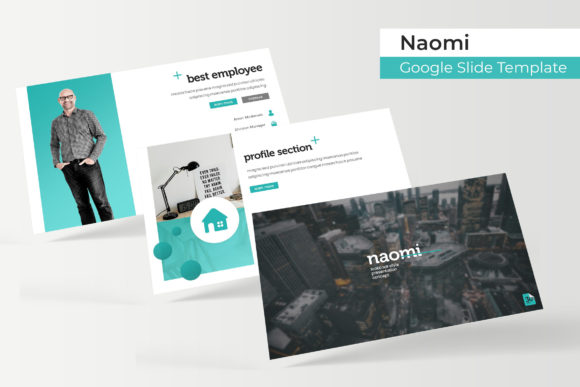
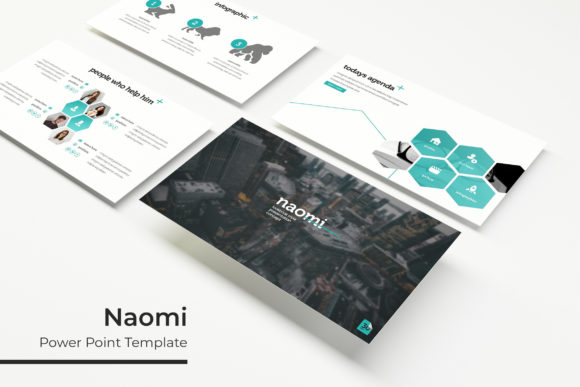
The Naomi Power Point Template is designed for professionals who need to communicate ideas with clarity and visual appeal. It's more than just a set of slides; it's a structured system built for real-world use. With over 150 meticulously designed slides, this template provides a robust foundation for everything from internal team meetings to high-stakes client pitches. The focus is on practicality, allowing you to concentrate on your message rather than the mechanics of design.
A Visual System Built for Speed and Cohesion
One of the biggest challenges in presentation design is maintaining visual consistency. When you're building slides individually, it's easy for fonts, colors, and spacing to drift, making the final deck look disjointed. Naomi solves this by operating on a master slide framework. Every element is pixel-perfect, ensuring that whether you're using a slide for a timeline, a data chart, or a team introduction, the overall aesthetic remains unified and professional.
The template includes five premade color palettes, each containing 30 unique slides. This isn't just about changing the background hue; each color variation is thoughtfully coordinated, with accent colors and graphic elements that work harmoniously together. You can instantly switch an entire presentation's mood from a cool, corporate blue to a warm, energetic orange with a single click, all while maintaining perfect design integrity. This feature is invaluable for agencies or freelancers who work with multiple clients, as it allows for rapid brand alignment without custom design work for every project.
Practicality extends to the working elements. The graphics are fully resizable and editable, meaning you can adjust infographics, charts, and icons to fit your specific data without distortion. The use of drag-and-drop picture placeholders is a significant time-saver. Instead of manually cropping and resizing images, you simply drag your photo into the designated area, and it snaps perfectly into the pre-designed frame. This functionality turns a potentially tedious task into a simple, satisfying step.
From Internal Reports to Client-Facing Pitches
Consider how this template adapts to different professional scenarios. For a startup founder preparing a pitch deck, Naomi's clean layouts and section break slides provide a logical narrative flow. The handcrafted infographic slides can transform complex market data into understandable, compelling visuals. For a marketing manager, the portfolio and gallery slides are perfect for showcasing campaign results, social media graphics, or product photography in a structured, impressive format.
Educators and trainers will find the variety of content slides—from bulleted lists to process diagrams—ideal for creating engaging learning materials. The widescreen format is optimized for modern displays and projectors, ensuring your content looks sharp in any meeting room. The inclusion of dedicated gallery slides means you can present visual case studies or project examples without awkwardly pasting images onto generic layouts.
Efficiency Without Sacrificing Customization
A common misconception about templates is that they stifle creativity. The opposite is true for a well-designed system like Naomi. By handling the foundational grid, typography, and color theory, it frees you to focus on customization and content strategy. You can easily update the master slides with your own brand fonts and colors, creating a bespoke template that's uniquely yours while still benefiting from the underlying structural excellence.
The package includes five PPTX files for both standard and widescreen formats, ensuring compatibility across different presentation environments. A detailed readme file guides you through setup, and links to the free fonts used in the design are provided, so you can achieve the exact look seen in the previews. It's important to note that the placeholder images are for demonstration only; you'll add your own photography or licensed stock images to complete your presentation.
Ultimately, a great presentation template is about reducing friction. It removes the guesswork from design decisions, accelerates your workflow, and guarantees a level of polish that enhances your credibility. Whether you're a solopreneur building your brand, a designer creating assets for clients, or a team lead needing consistent reporting, Naomi offers a versatile and reliable toolkit. It’s an investment in efficiency that pays dividends every time you need to present an idea with confidence and style.