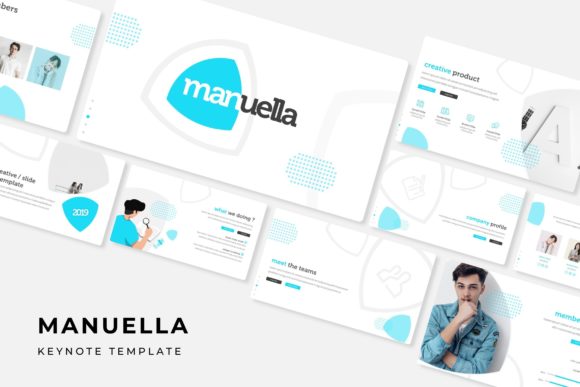
Manuella Keynote Template: A Deep Dive into Its Features
You're sitting down to build a presentation that needs to impress—maybe it's a client pitch, a workshop deck, or a product launch overview. You open your software, stare at the blank slide, and realize you need a starting point that actually looks polished without requiring hours of design work. That's where a resource like the Manuella Keynote Template steps in, offering a structured yet flexible foundation for anyone who needs to communicate ideas visually.
A Visual System Built for Clarity and Impact
What sets this template apart isn't just its aesthetic appeal—it's the thoughtful organization behind it. With over 150 total slides distributed across five premade color schemes, you're not just getting a single look. Each color variation contains 30 unique slides, which means you can choose a palette that aligns with your existing brand guidelines or experiment with something fresh. The color choices themselves range from muted, professional tones to bolder, more energetic options, giving you flexibility depending on whether you're presenting financial data or creative concepts.
The handcrafted infographics deserve particular attention. Rather than generic chart templates, these are designed with intention—each visual element serves a specific purpose in helping your audience grasp complex information quickly. Whether you're illustrating a process flow, comparing data sets, or mapping out a timeline, the infographics feel cohesive rather than like afterthoughts tacked onto text-heavy slides.
Practical Design for Real-World Presentations
One of the most useful features is the picture placeholder system. Instead of wrestling with image sizing and positioning, you simply drag and drop your photographs or graphics into designated areas. This saves considerable time when you're working with multiple images across dozens of slides. The placeholders are designed to maintain visual balance regardless of your source material, though it's worth noting that the preview photographs shown in marketing materials aren't included in the download—you'll need to supply your own imagery.
The section break slides function as visual pauses that help your audience mentally transition between topics. This is something many presenters overlook, but it makes a significant difference in comprehension. When you shift from discussing market analysis to your proposed strategy, a well-designed section slide signals that shift without you needing to verbally announce it every time.
Portfolio and gallery slides offer another practical layer. For designers, photographers, architects, or anyone whose work is visual, these layouts let you showcase samples without building custom grids from scratch. The layouts accommodate different aspect ratios and compositions, so whether you're displaying a logo suite, product photography, or architectural renders, the template adapts rather than forcing your work into rigid frames.
Technical Details That Actually Matter
Everything is built on master slides, which means making global changes—like adjusting a font size or swapping a color—is efficient rather than tedious. You modify the master once, and those changes cascade throughout the entire presentation. This is particularly valuable when you're customizing the template for different clients or projects from the same base design.
The pixel-perfect illustrations and resizable, editable graphics ensure your presentation looks sharp on any screen resolution. There's nothing worse than discovering your carefully chosen imagery appears blurry on a projector or high-resolution monitor. The vector-based elements scale cleanly, maintaining their crispness whether you're presenting on a laptop screen or a conference room display.
You'll receive five PPTX files in widescreen format, each corresponding to one of the color variations. A readme file walks you through setup, and the fonts used are freely available—the download link is included so you won't encounter missing font warnings when you open the files. This attention to the technical setup details prevents the frustrating experience of downloading a template only to spend an hour troubleshooting compatibility issues.
Matching the Template to Your Goals
Before diving into customization, consider what your presentation needs to accomplish. A pitch deck for investors requires different emphasis than a creative portfolio review or an internal team update. The Manuella Keynote Template accommodates various purposes, but your approach to using it should align with your specific objectives.
For branding presentations, leverage the consistent color schemes to reinforce visual identity. The five premade options give you enough variety to find one that complements your existing brand palette without clashing. If you're presenting to a client about their brand refresh, selecting a color variation that echoes their industry—perhaps a cooler tone for a tech company or a warmer one for a hospitality brand—demonstrates attention to detail before you've even spoken a word.
Small business owners often need to create presentations quickly without sacrificing professionalism. The drag-and-drop functionality and pre-structured layouts mean you can assemble a polished deck in a fraction of the time it would take to build from scratch. Whether you're pitching to potential partners, presenting quarterly results to stakeholders, or creating training materials for new hires, having a reliable template reduces the design burden significantly.
Working with Typography and Visual Hierarchy
While the template provides the structural foundation, your content decisions determine its effectiveness. Pay attention to how text and imagery balance on each slide. The layouts are designed with breathing room—white space that prevents visual overload. Resist the temptation to fill every available space with text. Instead, use the designated areas for key points and let supporting visuals carry part of the narrative.
The font pairings included in the template have been selected to work harmoniously, but understanding why they work can help you make informed adjustments. Typically, a clean sans-serif handles body text for readability, while a more distinctive display typeface draws attention to headlines. If you decide to swap fonts, maintain this contrast—pairing two similar typefaces often results in visual confusion rather than intentional hierarchy.
Consider your audience's viewing context as well. If you're presenting in a large room, larger text sizes and higher contrast become essential. The master slide system makes these adjustments straightforward—modify the text styles once, and every slide updates accordingly. For screen-shared presentations or downloadable PDFs, you have more flexibility with finer details since viewers can zoom in as needed.
Beyond the Presentation Itself
The value of a well-designed template extends beyond the live presentation. Exported slides can become social media content—individual graphics shared as Instagram posts, LinkedIn carousels, or Pinterest pins. The infographic slides work particularly well for this purpose, as standalone visual assets that communicate a single idea effectively. This approach lets you repurpose your presentation investment across multiple marketing channels.
For educators and workshop facilitators, the template structure supports teaching materials. The section breaks create natural lesson divisions, while the consistent visual framework helps students follow along without distraction. The gallery layouts can display examples, case studies, or student work in an organized manner that feels intentional rather than haphazard.
Ultimately, what makes a resource like this valuable is how it handles the design heavy lifting so you can focus on your actual message. The hours saved on layout decisions, alignment adjustments, and color coordination add up quickly—especially when you're creating presentations regularly. Having a reliable, professional foundation means you spend your creative energy on content and delivery rather than wrestling with software tools.
The included files are ready to open and customize immediately. Start by selecting the color variation that best suits your project, then work through the slides methodically, replacing placeholder content with your own. The structure is there to guide you, but every element remains fully editable, so the final result reflects your voice and vision rather than feeling like a template someone else designed.