Designing Presentations That Actually Resonate
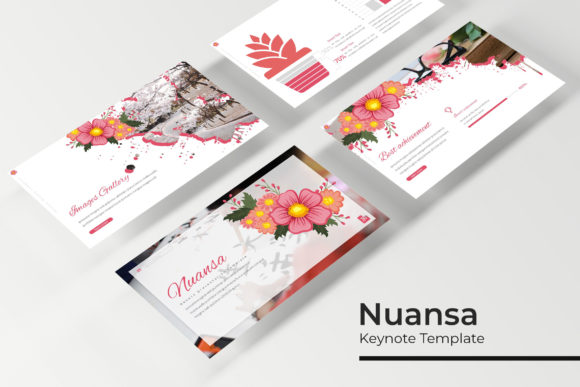
We’ve all sat through them—the presentations where the slides are crammed with text, the graphics look like they were pulled from a 1990s clip art gallery, and the overall effect is more confusing than compelling. In a world where attention spans are short and visual communication is paramount, the tools you use to present your ideas matter just as much as the ideas themselves. A thoughtfully crafted presentation template isn't just a set of pre-made slides; it's a framework for clarity, a tool for persuasion, and a silent ambassador for your brand's professionalism. This is where a resource like the Nuansa Keynote Template comes into play, designed not just to look good, but to function as a reliable partner in your storytelling process.
A Foundation Built for Flexibility
What immediately sets a template like Nuansa apart is its scale and adaptability. With over 150 total slides spread across five distinct color themes, it offers a vast library of visual components. Each of the five premade color palettes contains 30 unique slides, ensuring you’re not just changing a background color but working with a cohesive, fully realized visual language. This approach acknowledges a fundamental truth in design: one size does not fit all. A pitch deck for a tech startup demands a different aesthetic energy than a quarterly report for a financial firm or a portfolio for a freelance photographer. Having five ready-to-go color variations means you can quickly align your presentation with existing brand guidelines or explore a new direction without starting from a blank canvas.
The true power, however, lies in the construction of the slides themselves. Built on Master Slides, every element is designed for effortless customization. This is a game-changer for efficiency. Instead of manually adjusting the same font size or logo placement on 30 different slides, you make the change once on the master, and it cascades throughout your entire deck. This pixel-perfect foundation ensures that your final output is crisp, professional, and aligned, whether you're presenting on a projector in a boardroom or sharing a PDF on a laptop screen. The inclusion of resizable and editable graphics with picture placeholders that support drag & drop functionality further streamlines the workflow. You can swap out images, resize icons, and adjust diagrams without breaking the layout's integrity, which is crucial when you're iterating on content up until the last minute.
Visual Storytelling with Handcrafted Elements
Data and complex ideas often get lost in translation when presented as plain bullet points. This is where specialized slides become invaluable. The Nuansa template includes handcrafted infographics and dedicated section break slides. These aren't generic chart templates; they are designed to transform statistics into narratives and create natural pauses that guide your audience through the presentation's flow.
Consider a marketing professional explaining a new campaign strategy. Instead of a dense table of metrics, they can use a custom infographic slide to visualize customer journey touchpoints or social media engagement growth. A gallery and portfolio slide is equally critical for creatives—architects, designers, and artists need a clean, impactful way to showcase their work without the slides themselves competing for attention. These purpose-built components move your presentation from a document you read to a story you experience, significantly boosting audience engagement and information retention.
Beyond the Boardroom: Practical Applications
While "Keynote Template" suggests a formal presentation, the utility of such a comprehensive design system extends far beyond sales pitches. The consistent visual language and editable components make it a versatile asset for various branding and communication projects.
- Internal Communications & Training: Create professional onboarding materials, company-wide updates, or workshop guides that feel polished and intentional, reinforcing company culture.
- Marketing & Sales Collateral: Adapt the slides into high-converting social media graphics, webinar decks, or detailed product spec sheets. The consistent color themes ensure all materials feel unified.
- Educational Content: Teachers and course creators can build engaging lesson plans and lecture series. The structured layout helps break down complex subjects into digestible segments.
- Client Pitches & Reports: For agencies and consultants, using a template like Nuansa ensures every client deliverable has a consistent, high-quality look, building brand recognition and trust.
The key is to view the template not as a finished product, but as a design asset kit. The PPTX files are fully editable in PowerPoint, making it accessible to a wide range of users. The inclusion of a Readme First file and links to the free fonts used is a thoughtful touch, removing the guesswork and potential licensing hurdles that often accompany premium design resources.
Making It Your Own: Tips for Effective Use
Having a powerful template is the first step; using it effectively is the next. Here’s how to ensure a resource like Nuansa works for you, not against you.
Start with Your Content, Not the Slides. Outline your key messages and narrative arc first. Then, choose slide layouts from the template that best serve each point. Don’t force your content into a visually complex slide if a simple text layout communicates it better. The goal is readability and clarity.
Leverage the Color Themes Strategically. Don’t just pick your favorite color. Consider the context. Is the presentation for an internal brainstorming session? A vibrant, energetic palette might foster creativity. Is it a formal investor update? A more subdued, corporate-friendly theme may be more appropriate. Using the premade colors ensures visual harmony.
Customize with Purpose. Use the editable graphics to incorporate your own brand assets—your logo, specific brand colors, and custom photography. Replace placeholder text with your own concise, impactful copy. The template provides the structure; your unique content provides the soul.
Test Across Formats. Always preview your presentation in the mode you’ll be using—presenter view, full screen, and as a PDF. Check that text is legible, images are crisp, and animations (if used) enhance rather than distract. The pixel-perfect design should hold up, but a final check is professional diligence.
Ultimately, a well-structured presentation template like Nuansa is about reducing friction in the creative process. It handles the heavy lifting of layout, alignment, and visual consistency, freeing you to focus on what truly matters: your message and your audience. In an era where every visual touchpoint contributes to your professional perception, investing in a robust, flexible toolkit is a practical step toward more effective, confident, and resonant communication.