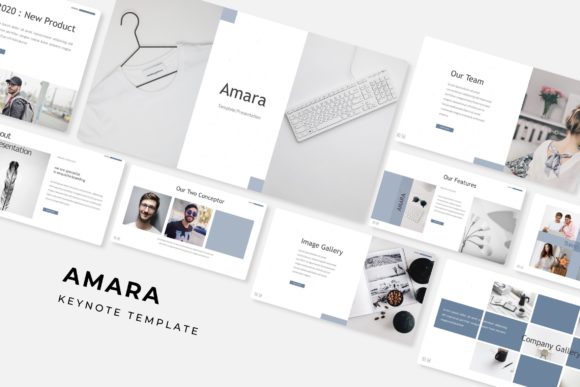
Designing Impactful Presentations with the Amara Keynote Template
There is a distinct difference between a presentation that simply displays information and one that actually tells a story. We have all sat through slideshows that feel disjointed—where the colors clash, the fonts are illegible, and the layout changes from slide to slide. It creates a subconscious friction for the audience. When you are trying to pitch a new idea, onboard a client, or share a portfolio, that friction is the enemy of engagement. This is where having a robust design system becomes non-negotiable. Enter the Amara Keynote Template, a comprehensive toolkit designed not just to make slides look pretty, but to streamline the entire workflow for designers, entrepreneurs, and marketers alike.
Why 150+ Slides Matter More Than You Think
At first glance, the number "150+" might seem like overkill. Do you really need that many slides for a quarterly review? Probably not. However, the value of the Amara Keynote Template lies in the sheer variety of its content architecture. When you are building a brand identity or pitching to investors, you rarely use a standard linear structure. You need flexibility.
With this template, you aren't just getting a blank canvas; you are getting a library of layouts. This includes specific slides for timelines, team introductions, data visualization, and pricing tables. For a small business owner or entrepreneur, this means you don't have to waste time manually drawing boxes and aligning text every time you have a meeting. You simply choose the slide that fits the specific data point you need to convey. It moves you from a "designer" mindset to an "editor" mindset, which is significantly faster and more efficient.
The Psychology of Color: Utilizing the 5 Premade Palettes
Color is one of the most powerful tools in visual communication, yet it is often the most difficult to get right. The Amara template solves the "analysis paralysis" of color theory by offering five distinct, premade color variations. Each variation comes with 30 dedicated slides, ensuring that the aesthetic remains consistent throughout the entire deck.
Why does this matter for your brand identity? Consistency breeds trust. If your audience sees a specific shade of teal used for headers in the introduction, they expect to see that same teal used for data points in the conclusion. These templates ensure that your visual consistency is locked in from the first slide to the last. Whether you are a marketer presenting a campaign strategy or a designer showcasing a mood board, having a cohesive color story elevates the perceived value of the work being presented.
Infographics and Data Visualization
Data is often dry. A spreadsheet filled with numbers rarely inspires anyone. However, data interpreted through handcrafted infographics can change minds. A key feature of the Amara suite is the inclusion of editable graphic sections and section break slides that allow for complex data to be broken down visually.
For those in marketing or running digital products, the ability to drag & drop your own statistics into pre-built charts is a game-changer. You aren't just typing numbers into a text box; you are utilizing pixel-perfect illustrations that guide the viewer's eye. This is particularly useful for editorial layouts where you might be summarizing a year-end report or creating social media graphics that require quick, digestible takeaways.
Practical Workflow: Master Slides and Resizable Graphics
One of the technical hurdles with many "premium" templates is that they are rigid. You try to move an image, and the whole layout breaks. The Amara Keynote Template is built on Master Slides, which is the industry standard for professional presentation design.
What does this mean for the user? It means that structural elements are locked and protected, while content elements are flexible. If you need to swap out a placeholder image, you simply drag and drop your photo into the designated area. The template handles the cropping and sizing for you. This is invaluable for content creators and bloggers who need to update their decks frequently for different audiences without breaking the underlying design grid. The resizable and editable graphics ensure that whether you are presenting on a massive projector screen or a laptop monitor, the resolution and layout hold up perfectly.
Beyond the Pitch: Versatile Applications
While the primary function is presentation, the utility of the Amara assets extends further. Consider the gallery and portfolio slides. For a photographer, interior designer, or crafter, these slides function as digital lookbooks. You can export these specific slides as high-quality PDFs to send to potential clients as a standalone portfolio piece.
Furthermore, the section break slides are designed with such visual impact that they can be repurposed. A small business owner could screenshot a section break, crop it, and use it as a header image for a newsletter or a website banner. The aesthetic is modern and clean, fitting well into packaging design mockups or poster concepts. It is about extracting maximum value from the assets you purchase.
Typography and Readability
Visuals grab attention, but typography holds it. The Amara template includes a curated selection of fonts (with free download links included in the readme file), ensuring that the text hierarchy is clear. Good modern typography isn't just about choosing a "pretty font"; it's about readability.
When you are presenting branding work, the way the text flows on the screen impacts how the information is absorbed. The headers in Amara are designed to be bold and commanding, acting as anchors for the eye, while the body text is sized for legibility even from the back of a room. This attention to typographic detail helps improve audience engagement because the viewer isn't straining to read the content; they can focus entirely on your message.
Final Thoughts on Usability
Ultimately, a template is a tool, and a tool is only as good as how it helps you do your job. The Amara Keynote Template removes the technical barriers to professional presentation. It allows a hobbyist to present with the polish of a design agency, and it allows a designer to save hours of production time that can be better spent on creative strategy.
Remember that while the template provides the structure and the design assets, the story is still yours to tell. Use the gallery slides to show your best work. Use the infographic slides to prove your results. Use the clean layouts to let your ideas breathe. In the end, the goal isn't just to show slides; it's to make an impact that lasts long after the projector is turned off.