Festive Branding Made Easy: A Modern Christmas Poster Template
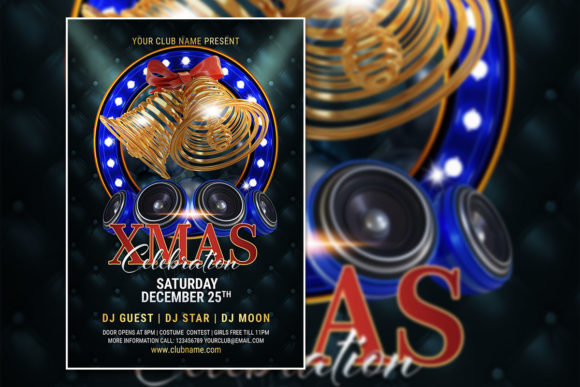
The holiday season is a whirlwind of activity for businesses and creatives. Between planning promotions, finalizing inventory, and scheduling social media, the last thing you need is to start a design from scratch. A high-quality, ready-to-edit template is a lifesaver, transforming a stressful task into a streamlined, creative process. This is where a versatile Modern Xmas Celebration Poster Template becomes an indispensable asset in your holiday toolkit.
Beyond Basic Holiday Greetings: A Tool for Strategic Communication
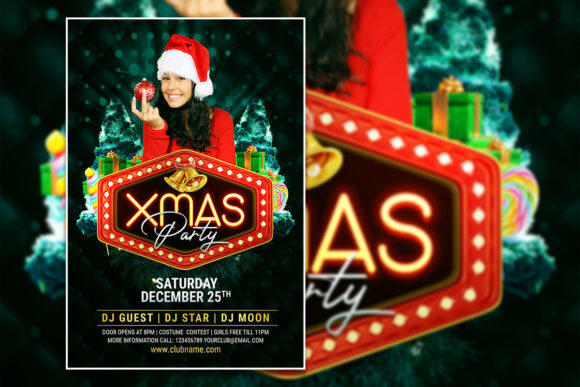
Forget the clip-art Santas and generic snowflakes. A thoughtfully designed template serves as a strategic foundation for your entire holiday visual campaign. It's not just a flyer; it's a starting point for cohesive branding. The visual appeal lies in its modern aesthetic—clean lines, sophisticated typography, and a balanced color palette that can be adapted to match any brand identity. This approach ensures your materials feel current and professional, whether you're a boutique shop, a local café, a freelance photographer, or a community center hosting a gala.
The true power of a fully editable PSD file is its adaptability. You're not locked into a single vision. The organized layers in Adobe Photoshop allow you to deconstruct and rebuild the design to fit your specific needs. Swap out the background photo for a stunning image of your own products, your team, or your event venue. Adjust the color scheme with a few clicks to align with your brand's signature hues. This level of customization means your final output is uniquely yours, not a copy of a template used by thousands of others.
Practical Applications: From Social Media to Storefront Windows
Let's talk real-world use. The 2000 x 3000 pixel dimension at 300 DPI is perfect for high-resolution printing, ensuring your posters and flyers look crisp and vibrant. But the applications extend far beyond a single printed piece. Here’s how you can leverage this single asset across multiple platforms:
- Digital Marketing & Social Media: Resize the design for Instagram posts, Facebook event covers, or email newsletter banners. The RGB color mode is optimized for screens, guaranteeing your graphics pop online.
- Print Collateral: Create cohesive printed materials. Use the template for in-store posters, table tents for a holiday menu, or takeaway flyers for a Christmas sale. The professional presentation instantly elevates your brand's perceived value.
- Event Invitations & Promotions: Hosting a holiday party, a charity fundraiser, or a special customer appreciation night? This template provides an elegant and festive frame for your invitation details, setting the tone for a memorable event.
- Internal Communications: Use it to design festive notices for your team, holiday schedule announcements, or celebratory graphics for your company intranet.
By using one template as the source, you ensure visual consistency across all touchpoints. This builds brand recognition and presents a unified, professional front to your audience. When your social media graphic matches the poster in your window and the flyer handed out at a local market, it reinforces your message and brand identity powerfully.
Design Decisions: Typography, Color, and Imagery
A template is a guide, not a gospel. Making it your own involves a few key design considerations. First, examine the typography. The included font download link is a starting point. If your brand uses a specific premium font, especially a modern serif for elegance or a clean sans serif for clarity, you can easily select the text layers and update them. Consider font pairing—a script font for the main headline can be beautifully contrasted with a simple sans serif for the body details, creating a hierarchy that guides the viewer's eye.
Next, assess the color palette. While the template may come in classic red and green, don't be afraid to experiment. A navy and gold palette conveys sophistication, while a white and silver scheme feels modern and minimalist. Align these colors with your existing brand identity for seamless integration. Finally, the imagery is your most powerful tool for personalization. A generic Christmas stock photo is forgettable. A photo of your actual storefront decorated for the holidays, your team wearing festive sweaters, or your bestselling product wrapped as a gift creates an authentic connection with your local audience or loyal customers.
Maximizing Your Investment: Tips for a Polished Final Product
To get the most out of your editable PSD template, follow these practical steps. Always start by reading the included help file. It will detail the font download and any specific layer organization. Before you begin editing, duplicate the original PSD file so you have a pristine copy to return to if needed. Work methodically through the layers, renaming them as you customize (e.g., "YourLogo," "EventDate," "HeadlineText") to keep your project organized.
Test your final design at multiple sizes. Zoom out to see how it looks as a thumbnail on a social media feed. Print a test copy to check for color accuracy and text readability. Ensure all critical information—date, time, location, website—is legible from a distance. This attention to detail separates amateurish designs from professional marketing materials. Remember, the goal is not just to make something that looks pretty, but to create a clear, engaging, and effective communication tool that drives action, whether that's attending an event, visiting a store, or taking advantage of a holiday sale.
This Christmas, let your creativity focus on strategy and storytelling, not on building every graphic element from the ground up. A robust, customizable template empowers you to produce a suite of professional marketing assets efficiently, ensuring your brand shines brightly throughout the festive season.